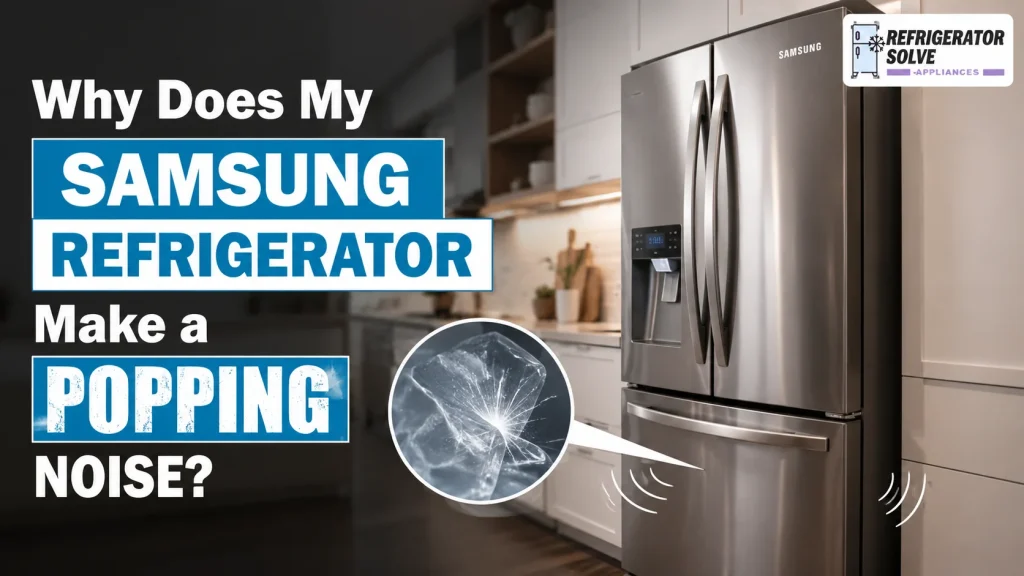
A sudden popping sound from your Samsung refrigerator can be unsettling, especially when it happens in the middle of the night. You may wonder whether the compressor is failing, the ice maker is broken, or an electrical component is about to stop working.
Fortunately, an occasional pop, crack, or snap is usually normal. Samsung refrigerators contain plastic liners, metal panels, cooling pipes, fans, water valves, and defrost components that change temperature throughout the day. As these materials warm and cool, they may expand or contract and release a sharp popping sound.
The noise may also come from ice dropping into the storage bucket, water entering the ice maker, the compressor changing speed, or the refrigerator touching a nearby wall or cabinet.
However, a very loud or repetitive popping noise should not always be ignored. If it appears alongside poor cooling, heavy frost, water leaks, a burning smell, repeated electrical clicking, or an error code, your refrigerator may need professional attention.
This guide will help you identify the source of the noise, understand which Samsung refrigerator sounds are normal, perform safe troubleshooting, and decide when to contact Samsung Support or a qualified appliance technician.
Quick Answer
Your Samsung refrigerator is most likely making a popping noise because plastic and metal components inside the appliance are expanding or contracting as the temperature changes.
This commonly happens:
- During the automatic defrost cycle
- When the compressor starts or stops
- When a new refrigerator is cooling for the first time
- After warm food is placed inside
- After the doors have been open for a long time
- When ice drops into an empty ice bucket
- When the ice maker fills with water
- After a power outage or temperature change
Samsung identifies snapping, crackling, and popping as normal operating sounds when they result from internal plastic parts responding to temperature changes. These noises are particularly common during defrosting and in newer refrigerators adjusting to their surroundings.
You should investigate further if the noise is extremely loud, occurs every few seconds, or is accompanied by weak cooling, excessive frost, fan scraping, leaking, smoke, sparks, or a burning smell.
Is It Normal for a Samsung Refrigerator to Make Popping Noises?
Yes. Occasional popping noises are normal for most Samsung refrigerators.
A refrigerator is not designed to be completely silent. The compressor, circulating fans, automatic defrost system, refrigerant pipes, ice maker, and water inlet valve all operate at different times. Each component can create its own sound.
Normal Samsung refrigerator sounds may include:
- Light popping or cracking
- A brief click when operation begins or ends
- Humming from the compressor
- Bubbling or gurgling from refrigerant movement
- Hissing during defrosting
- Buzzing while the ice maker fills
- A bang when ice falls into the bucket
- Whooshing as pressure equalises around the doors
Samsung Australia explains that cracking, snapping, and popping occur as plastic components expand and contract when the refrigerator temperature rises or falls. Samsung UK also lists cracking during automatic defrosting as a normal feature of the appliance.
A normal pop generally has the following characteristics:
- It happens occasionally rather than continuously.
- The refrigerator and freezer remain cold.
- No warning or error code appears.
- There is no burning or electrical smell.
- The outlet and plug are not unusually hot.
- The noise may coincide with defrosting or ice production.
- The sound does not interrupt normal conversation.
- It may become less noticeable as a new refrigerator settles.
Samsung recommends requesting service when popping or cracking becomes unusually loud rather than remaining a relatively minor background sound.
Normal vs. Abnormal Samsung Refrigerator Popping Sounds
| What You Hear or Notice | Most Likely Cause | Recommended Action |
|---|---|---|
| An occasional light pop | Normal expansion or contraction | No repair is usually needed |
| Popping during or after defrosting | Interior materials changing temperature | Monitor normal operation |
| A loud bang near the freezer | Ice falling into the bucket | Normal if ice production works |
| Buzzing or popping near the rear | Water valve, water line, or wall contact | Check the water supply and clearance |
| Popping after installing a new refrigerator | Initial cooling and settling | Allow time and confirm proper installation |
| A pop when opening the door | Hinge, door harness, or alignment | Check levelling and door movement |
| Repeated clicking with poor cooling | Compressor, electrical, or control problem | Request professional diagnosis |
| Tapping or scraping that stops when the door opens | Fan contacting ice | Arrange service |
| Popping with thick freezer frost | Defrost or airflow problem | Request service |
| Popping with smoke or a burning smell | Possible electrical fault | Disconnect power if safe and seek urgent help |
What Causes a Samsung Refrigerator to Make a Popping Noise?
The location and timing of the sound usually provide the best clues. Below are the most common Samsung-specific causes.
1. Interior Parts Expanding and Contracting
Thermal expansion is the most common cause of a Samsung refrigerator popping noise.
The temperature inside the refrigerator does not remain perfectly constant. It falls while the compressor is cooling and rises slightly when the compressor stops or the automatic defrost system operates.
Plastic liners, shelves, insulation, pipes, and metal cabinet panels respond to those temperature changes at different rates. Pressure can build between adjoining materials and then release suddenly, producing a pop, crack, or snap.
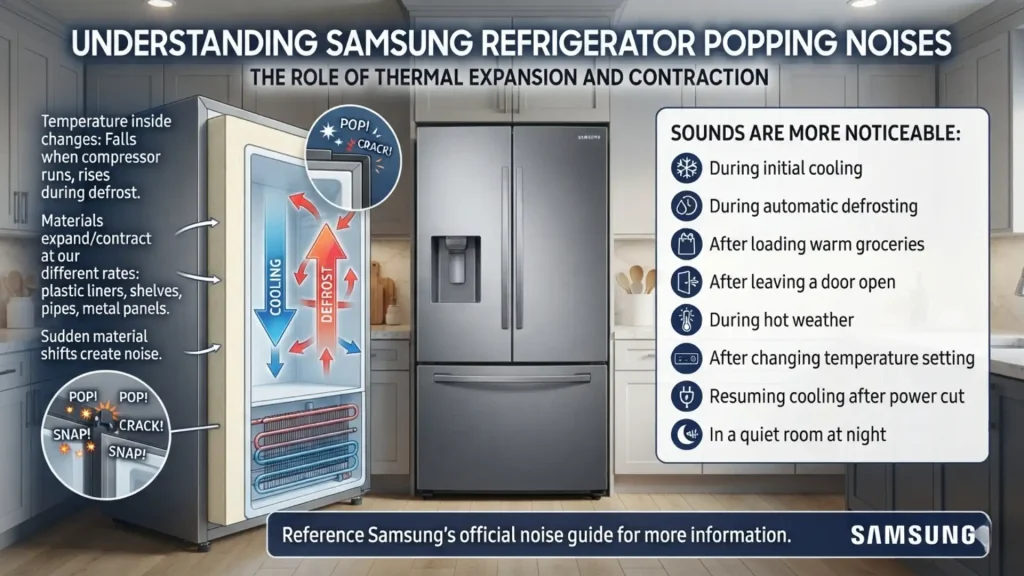
This sound is more noticeable:
- During initial cooling
- During automatic defrosting
- After loading the refrigerator with warm groceries
- After leaving a door open
- During hot weather
- After changing the temperature setting
- When the refrigerator resumes cooling after a power cut
- In a quiet room at night
Samsung’s official noise guidance describes this expansion and contraction as normal and notes that it often occurs during defrosting.
Does Thermal Popping Need to Be Fixed?
Usually, no.
When cooling is normal and the sound only happens occasionally, replacing parts is unlikely to help. The noise is coming from normal material movement rather than a failed component.
You may still be able to reduce how loud it sounds by levelling the appliance, providing proper ventilation space, and preventing the refrigerator from touching nearby surfaces.
2. The Automatic Defrost Cycle
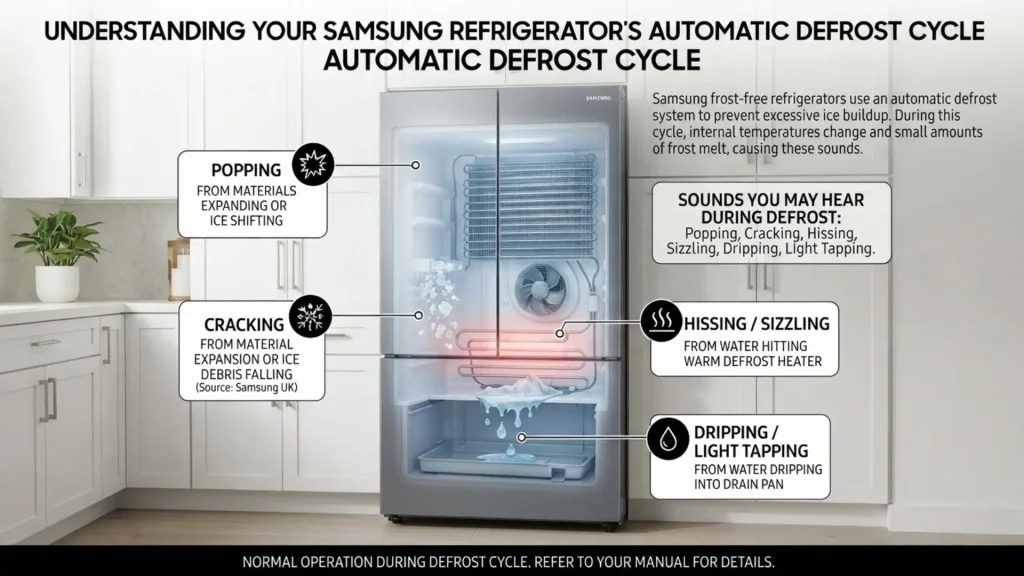
Samsung frost-free refrigerators use an automatic defrost system to prevent excessive ice from accumulating around the cooling components.
During defrosting, internal temperatures change and small amounts of frost melt. You may hear:
- Popping
- Cracking
- Hissing
- Sizzling
- Dripping
- Light tapping
The popping may come from interior materials expanding as they warm or from small pieces of ice shifting during thawing. Samsung UK states that cracking can result from material expansion or ice debris falling during the defrost process. Samsung Australia also associates popping noises with the defrost cycle.
When Defrost Noise May Indicate a Problem
The noise deserves closer attention when it appears with:
- Heavy frost on the freezer’s rear wall
- A scraping fan
- Reduced airflow
- Food beginning to soften
- Water collecting beneath the drawers
- Water leaking onto the floor
- The refrigerator running almost continuously
- An error code on the display
These symptoms may point to a defrost, drainage, sensor, fan, door-seal, or airflow problem rather than normal thermal movement.
3. A New Samsung Refrigerator Settling In
New Samsung refrigerators often sound more active than the appliances they replace.
When first switched on, the refrigerator must cool the entire cabinet, shelves, compartments, insulation, and stored food from room temperature. The compressor and fans may run longer or at higher speeds while the appliance reaches its set temperature.
At the same time, plastic and metal parts are experiencing their first major temperature changes inside your home. This can make pops and cracks more frequent.
Samsung states that new refrigerators may produce more noticeable sounds while adjusting to the temperature and humidity of their new environment. The popping generally becomes less noticeable with normal use.
A new refrigerator may also be noisier because:
- It has not yet been correctly levelled.
- The rear panel is too close to the wall.
- A water line is tapping against the cabinet.
- Packaging or shipping materials remain in place.
- Ice is falling into an empty bucket for the first time.
- The refrigerator contains fewer items to absorb sound.
- A door harness or hinge is settling into position.
Confirm that the installation follows the manual supplied with your exact model. Do not assume that clearance or levelling instructions are identical across all Samsung refrigerators.
4. Ice Dropping Into the Storage Bucket
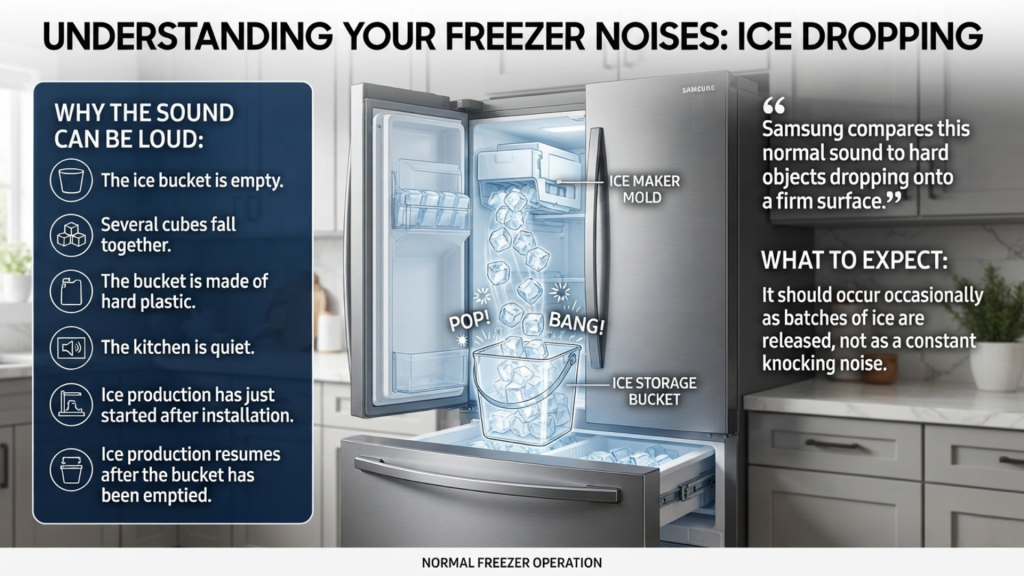
A sudden bang or pop from the freezer may simply be ice falling into the bucket.
The sound can be surprisingly loud when:
- The ice bucket is empty.
- Several cubes fall together.
- The bucket is made of hard plastic.
- The kitchen is quiet.
- Ice production has just started after installation.
- Ice production resumes after the bucket has been emptied.
Samsung compares this normal sound to hard objects dropping onto a firm surface. It should occur occasionally as batches of ice are released, not as a constant knocking noise.
How to Confirm the Ice Maker Is Responsible
Listen for the noise around the freezer or ice compartment. Then check whether new cubes have recently appeared in the bucket.
You can also temporarily switch the ice maker off using the control panel or procedure in your model’s manual. If the popping stops, the sound is likely related to ice production.
Do not force the ice tray, motor, or ejector mechanism by hand.
5. The Ice Maker Filling With Water
The water inlet valve opens briefly when the ice maker needs water. This normally produces a short buzzing or humming sound, although pressure changes may sometimes be perceived as a pop or knock.
The sound may be louder when:
- Water pressure is too high.
- The supply valve is not fully open.
- The water filter is restricted.
- The supply tube is bent.
- The tube is touching the refrigerator or wall.
- Air remains in a newly installed water line.
- The ice maker is switched on without a connected supply.
Samsung advises turning off the ice maker when no water line is connected. Otherwise, the valve may continue attempting to fill the ice maker and create unnecessary noise.
What to Check
Without disconnecting plumbing unnecessarily, verify that:
- The household water supply is turned on.
- The refrigerator’s water line is connected.
- The line is not kinked, trapped, or pressed against the wall.
- The water filter is installed correctly.
- Water flows normally from the dispenser, if fitted.
- The ice maker is turned off when no water supply is available.
Water-pressure requirements differ by model and country. Use the specifications in your manual or contact Samsung Support rather than adjusting plumbing based on a universal number.
6. The Refrigerator Is Touching a Wall or Cabinet
A normal internal sound may become much louder when the refrigerator transfers vibration to another surface.
Possible contact points include:
- The back wall
- A kitchen cabinet
- Countertop trim
- A water pipe
- The power cord
- The water supply tube
- Another appliance
- Objects stored on top of the refrigerator
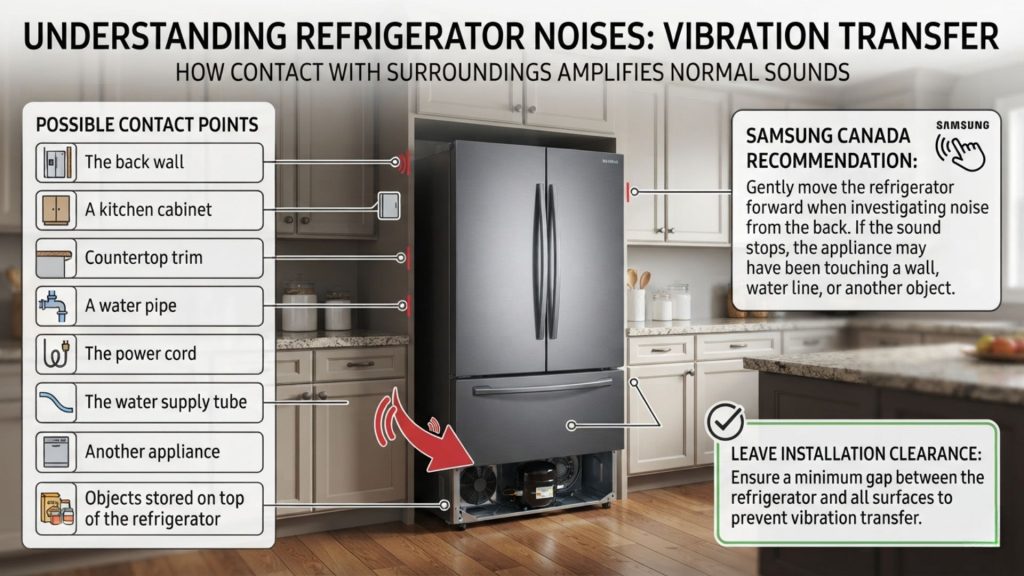
Samsung Canada recommends gently moving the refrigerator forward when investigating noise from the back. If the sound stops, the appliance may have been touching a wall, water line, or another object.
Leave the installation clearance required for your exact model. Samsung’s spacing recommendations vary according to refrigerator type, market, and installation design, so your model’s installation manual should be the final authority.
7. The Samsung Refrigerator Is Not Level
An unlevel refrigerator can produce or amplify popping, knocking, rattling, and hinge noises.
When the cabinet is twisted slightly:
- Plastic panels may sit under additional stress.
- A door may rise or drop while opening.
- Bottles and shelves may vibrate.
- A fan may not sit correctly.
- The cabinet can transfer vibration into the floor.
- Doors may fail to seal properly.
Samsung advises checking that the levelling legs have firm contact with the floor. Samsung UK also recommends adjusting the feet and positioning the refrigerator upright when trying to reduce vibration-related noise.
Use a spirit level and follow your model’s installation instructions. Some refrigerators require a slight front-to-back angle for proper door closing, so do not aim for a different position without checking the manual.
8. Bottles, Shelves, or Drawers Are Shifting
Sometimes the refrigerator creates a normal vibration, but objects inside turn it into a loud pop.
Check for:
- Glass bottles touching each other
- Containers resting against an interior wall
- A shelf that is not seated correctly
- A loose door bin
- An improperly installed drawer
- An ice bucket that is not fully inserted
- Objects stored on top of the refrigerator
- Tall items tipping when the compressor starts
Samsung UK recommends removing and repositioning food and checking that containers are not striking one another when investigating vibration sounds.
Leave a small gap between glass containers and make sure removable components are fully seated.
9. The Compressor Starting, Stopping, or Changing Speed
The compressor moves refrigerant through the cooling system. Depending on your Samsung model, it may start and stop or vary its operating speed in response to cooling demand.
A normal compressor sound may include:
- A soft click
- A low hum
- A brief thump
- A change in pitch
- A quiet motor-like sound
- A short sound as the fan slows down
Samsung’s support guidance explains that compressor operation may involve changes in speed, light clicking, and motor-like sounds. Samsung UK notes that some AC-compressor models make a click when starting or stopping, while inverter-compressor designs operate differently.
When Compressor Clicking Is Not Normal
Request service when you hear a repeating pattern such as:
Click, silence, click, silence
and the refrigerator is not cooling properly.
Do not remove the compressor terminal cover, test live wiring, or replace electrical components based only on the sound. A technician may need to test the power supply, control system, compressor, or associated components.
10. Refrigerant Moving Through the Sealed System
Refrigerant moves through sealed pipes as the refrigerator cools. It changes pressure and state while travelling through the system, which can create:
- Bubbling
- Gurgling
- Tapping
- Dripping
- Light knocking
- Occasional popping
Samsung lists bubbling and gurgling from refrigerant circulation as normal operating sounds. Pipes may also vibrate slightly while refrigerant moves through them.
The sealed refrigeration system is not a DIY service area. Do not bend, cut, loosen, heat, or puncture any refrigeration pipe.
11. Ice Buildup Around the Evaporator Fan
A repeated tapping, clicking, or popping sound from inside the freezer may come from a fan blade striking ice.
Clues include:
- The noise stops or changes when the freezer door opens.
- Frost is visible on the rear interior panel.
- The sound resembles a card hitting bicycle spokes.
- Airflow from the vents feels weak.
- The refrigerator compartment is becoming warm.
- The freezer remains cold while fresh food warms.
- The sound has gradually become more frequent.
Samsung explains that fan noise caused by ice buildup may temporarily disappear after defrosting, but service is needed to correct the underlying cause if the ice returns. Samsung also warns against using a hair dryer or another external heat source to accelerate defrosting because it can damage the refrigerator.
Do not break the ice with a knife, screwdriver, or other sharp object. Hidden refrigerant pipes and wiring can be damaged.
12. A Door Hinge or Wire Harness Is Popping
When the noise occurs only as a door opens or closes, the problem may be mechanical rather than refrigeration-related.
Possible causes include:
- A hinge under strain
- An unlevel cabinet
- A misaligned door
- A door wire harness shifting beneath the hinge cover
- A damaged closing cam
- A loose hinge component
- An overloaded door bin
- The door rubbing against nearby furniture
Watch the top and bottom of the door while opening it slowly. Look for lifting, dropping, sideways movement, or rubbing.
Samsung’s Canadian guidance notes that a door harness in some new refrigerators may take time to seat correctly through normal door use. It also recommends food-grade silicone for appropriate hinge lubrication and specifically warns against using WD-40 around the hinges.
Because hinge and door construction differs between models, consult the manual before removing a hinge cover or applying any lubricant.
Why Does My Samsung Refrigerator Make a Loud Popping Noise?
The refrigerator cabinet acts like a large sound box. A small internal movement can sound much louder after travelling through plastic liners, insulation, metal panels, flooring, and surrounding cabinets.
A normal pop may seem unusually loud when:
- The ice bucket is empty.
- The refrigerator is installed inside a tight alcove.
- A panel is touching a cabinet.
- The appliance is not level.
- The kitchen has tile or hardwood flooring.
- The house is quiet at night.
- The refrigerator contains very little food.
- The unit has just completed defrosting.
- A major temperature change has occurred.
Volume alone does not prove that a component has failed. The frequency, location, timing, and presence of other symptoms are more useful.
Still, Samsung advises requesting service when cracking, snapping, or popping becomes loud enough to be disruptive.
How to Fix a Samsung Refrigerator Popping Noise
You cannot always eliminate normal thermal popping. You can, however, rule out installation, water-supply, ice-maker, door, and vibration problems.
Follow these steps in order.
Step 1: Confirm That the Refrigerator Is Cooling
Before focusing on the sound, check the appliance’s primary function.
Look for:
- Cold drinks in the refrigerator compartment
- Fully frozen food in the freezer
- Air moving through the vents
- Doors closing completely
- No unexpected temperature warning
- No unusual error code
- No large frost buildup
- No food beginning to spoil
Use an appliance thermometer when you need an accurate reading. Follow the temperature settings recommended in the manual for your model and region.
If cooling has failed, skip cosmetic noise adjustments and arrange diagnosis.
Step 2: Record When the Pop Happens
For several hours, note whether the sound occurs:
- When the compressor starts
- When the compressor stops
- After the water dispenser is used
- When ice falls
- During the night
- After opening a door
- After closing a door
- After warm food is added
- During a visible defrost period
- Every few seconds
- Only once or twice per hour
A short audio or video recording can help Samsung Support or a technician identify an intermittent noise.
Step 3: Locate the General Area
Listen without removing electrical covers.
Inside the freezer: Check for ice maker activity, falling ice, visible frost, or fan-related tapping.
Inside the fresh-food compartment: Look for loose shelves, bottles, drawers, vents, or liner movement.
At the door: Check hinges, alignment, door bins, and rubbing.
At the lower rear: Consider the compressor, water valve, water line, or wall contact.
Beside the cabinet: Look for contact with kitchen furniture, trim, pipes, or another appliance.
Keep your hands away from moving fans, exposed wiring, and compressor connections.
Step 4: Level the Refrigerator
Use a spirit level to check the refrigerator from side to side and front to back.
Adjust the levelling legs according to your model’s installation manual. Make sure:
- The appliance does not rock.
- The legs rest firmly on the floor.
- The doors align correctly.
- The doors close as designed.
- The cabinet is not leaning against anything.
Recheck the noise after the appliance has completed several cooling cycles.
Step 5: Check Installation Clearance
Inspect the space around the refrigerator.
Confirm that:
- The rear is not touching the wall.
- The sides are not vibrating against cabinets.
- The top has the required ventilation space.
- The power cord is not trapped.
- The water tube is not striking the rear panel.
- Objects have not fallen behind the appliance.
Switch off and unplug the refrigerator before moving it. Use another person to help with a large appliance and avoid damaging the floor or water connection.
Step 6: Rearrange Containers and Removable Parts
Separate bottles, jars, and hard containers.
Then reseat:
- Glass shelves
- Door bins
- Freezer baskets
- Produce drawers
- Ice buckets
- Removable trays
- Water pitchers
- Internal accessories
Remove loose objects stored on top of the refrigerator.
Step 7: Check the Water Supply
For a refrigerator with a dispenser or automatic ice maker:
- Confirm that the household supply valve is open.
- Inspect the visible line for bends or kinks.
- Make sure the line is not striking the wall.
- Check that the water filter is installed correctly.
- Dispense water and listen for unusual valve noise.
- Turn off the ice maker if no water line is connected.
Do not dismantle the inlet valve or loosen plumbing while the refrigerator remains connected to power and water.
Step 8: Observe the Ice Maker
Check whether the sound coincides with ice production.
A test cycle may be useful when the ice maker is not producing ice, but it should not be the first response to an otherwise normal popping sound.
The location of the Samsung ice-maker Test button varies. It may be on the front, side, bottom, or rear of the ice maker, sometimes behind the bucket. Samsung warns not to press the Test button repeatedly because water can overflow or ice can jam. Consult the exact model manual before beginning a test.
Do not reset the entire refrigerator simply to eliminate normal cabinet popping.
Step 9: Check the Doors
Open and close each door slowly.
Look for:
- A pop at the same point each time
- The door rising or dropping
- A hinge rubbing
- A bin striking an interior component
- A gasket folding or catching
- A door touching a cabinet
- A loose or shifting hinge cover
Correct levelling first. Contact Samsung or a technician when the hinge, wiring, or door requires disassembly.
Step 10: Check for Fan Ice
If the popping resembles fast tapping or scraping:
- Open the freezer door and listen for a change.
- Look for frost on the rear interior panel.
- Check whether airflow feels weak.
- Observe whether the fresh-food compartment is warming.
Do not use a heat gun, hair dryer, boiling water, or sharp tool. Arrange service when ice around the fan returns or cooling is affected.
Step 11: Monitor the Refrigerator
If the refrigerator is cooling correctly and no fault is found, monitor it for several days.
Keep a simple record of:
- Time of the noise
- Where it is loudest
- Whether the compressor is running
- Whether ice has just dropped
- Any temperature change
- Any error code
- Whether the sound is becoming louder
Occasional pops linked to temperature changes usually require no repair.
Does a New Samsung Refrigerator Still Make Popping Noises?
Yes. A new Samsung refrigerator may continue making occasional popping noises after installation.
The sound often comes from the cabinet liner and other materials adjusting to repeated heating and cooling. It may also come from the first defrost cycles, initial ice production, longer compressor operation, or minor installation vibration.
Samsung says these sounds are more common in new refrigerators and typically become less noticeable as the appliance acclimates to the home.
Contact the retailer or Samsung Support sooner when a new refrigerator has:
- Physical or transport damage
- Extremely loud continuous popping
- Poor cooling
- Water leaking
- A door that does not close
- Heavy frost
- A damaged cord or plug
- An error code
- Smoke or a burning smell
Where to Find Your Samsung Refrigerator Model Number
You will need the complete model code and serial number when downloading a manual, checking warranty coverage, ordering a part, or requesting service.
On many Samsung refrigerators, the information label can be found:
- Inside the refrigerator compartment on a side wall above the upper shelf
- On the lower-left exterior area near the front
The location can differ between models and markets. Samsung’s official support tools allow users to search by model code to access manuals, troubleshooting information, warranty details, and repair options.
Take a clear photograph of the label so you do not need to move the refrigerator again.
Do not confuse the model name with the full model code. The code may include letters or suffixes identifying the market version of the appliance.
When to Contact Samsung Support or a Technician
Request professional help when:
- The popping is unusually loud or disruptive.
- The noise occurs continuously.
- The refrigerator is no longer cold enough.
- The compressor repeatedly clicks without remaining on.
- A scraping fan sound comes from the freezer.
- Heavy frost repeatedly develops.
- Water leaks from or beneath the appliance.
- The door does not align or seal.
- An error code appears.
- The ice maker repeatedly jams.
- The noise returns after basic installation checks.
- A hinge or electrical harness needs disassembly.
- The appliance is still covered by warranty.
Samsung provides model-specific manuals, troubleshooting, warranty information, and repair-request options through its regional support pages.
Stop using the refrigerator and disconnect it from power, provided you can do so safely, if you notice:
- Smoke
- Sparks
- A burning smell
- A damaged or melted plug
- An unusually hot outlet
- Repeated circuit-breaker trips
- An electrical shock or tingling sensation
Consumer electrical-safety guidance recommends unplugging an appliance that repeatedly trips a breaker, gives an electrical shock, smokes, or smells as though it is burning, followed by qualified repair.
Do not reach behind the refrigerator when smoke, sparking, melted wiring, or water around an electrical connection makes it unsafe. Isolate power at the appropriate breaker only when you can do so without risk.
Frequently Asked Questions About Samsung Refrigerator Make a Popping Noise
Why Does My Samsung Refrigerator Keep Making a Popping Noise?
Repeated but widely spaced pops may be caused by normal cooling and defrost cycles. Plastic and metal components expand and contract each time the internal temperature changes.
Investigate further when the sound happens every few seconds, cooling becomes weak, or the compressor repeatedly tries to start.
Why Does My Samsung Refrigerator Make Popping Noises at Night?
Refrigerator sounds are more noticeable at night because the surrounding environment is quieter.
The refrigerator may also enter a defrost cycle, release ice into the bucket, or restart the compressor during the night. Check that it is level and not touching a wall or cabinet.
Why Is My New Samsung Refrigerator Making Loud Popping Noises?
A new Samsung refrigerator experiences larger temperature changes while initially cooling. Its cabinet materials, liners, and internal components may produce more cracking and popping while settling into the home.
Confirm proper levelling, clearance, water-line installation, and cooling. Request service if the noise is extreme or accompanied by another fault.
Can the Samsung Ice Maker Make a Popping Sound?
Yes. Ice releasing from the mould or falling into an empty bucket may produce a loud pop or bang. The water valve may also create a brief noise while filling the ice maker.
Turn the ice maker off temporarily to see whether the sound stops. Follow your model’s manual rather than forcing or dismantling the mechanism.
Why Does My Samsung Refrigerator Pop After I Use the Water Dispenser?
The water inlet valve and supply line experience a pressure change during and after dispensing. A line that touches the wall or rear panel may create a knock or pop.
Check the visible line for kinks and contact points. Persistent noise, weak flow, leaking, or valve chatter may require plumbing or appliance service.
Why Does My Samsung Refrigerator Pop After a Power Outage?
After power returns, the refrigerator works to restore its internal temperature. The larger temperature change can increase expansion and contraction noises.
Monitor cooling and the display. Follow the manual if an error code remains after power is restored.
Why Does My Samsung Refrigerator Make a Pop When the Door Opens?
A pop linked specifically to door movement may come from a hinge, closing cam, wire harness, door bin, or misalignment.
Check whether the refrigerator is level and whether the door rises, drops, or rubs. Do not remove hinge wiring without following the model-specific manual.
Can I Completely Stop My Samsung Refrigerator From Popping?
You may be able to eliminate noises caused by wall contact, poor levelling, loose containers, the water line, or door alignment.
Normal thermal popping cannot always be removed because it results from materials responding to temperature changes. An occasional pop with normal cooling does not usually require repair.
Should I Reset My Samsung Refrigerator Because of a Popping Noise?
Not usually.
Resetting the entire refrigerator will not prevent plastic and metal components from expanding or contracting. It may also clear useful diagnostic information.
Use a model-specific reset only when Samsung’s manual or support instructions recommend it for a particular fault.
Should I Unplug a Samsung Refrigerator That Pops?
An occasional pop with normal cooling does not require unplugging the refrigerator.
Disconnect it when the noise is accompanied by smoke, sparks, a burning smell, an electrical shock, a damaged cord, an overheating outlet, or repeated circuit-breaker trips. Seek professional assistance before reconnecting it.
How Long Do New Samsung Refrigerator Popping Noises Last?
There is no fixed timeline for every model or household. The frequency commonly decreases as the refrigerator settles into regular cooling and defrost cycles.
Persistent, extremely loud, or worsening noise should be assessed rather than dismissed as normal.
Final Thoughts
So, why does your Samsung refrigerator make a popping noise?
In most cases, the answer is normal thermal movement. Plastic liners, cabinet panels, cooling components, and other internal materials expand and contract as the appliance cools and defrosts. Ice dropping into the bucket, water entering the ice maker, refrigerant movement, and compressor operation can create additional sounds.
Begin with simple checks. Confirm that the refrigerator is cooling, identify where the noise originates, level the appliance, provide the required clearance, separate containers, inspect the visible water line, and observe the ice maker.
An occasional pop with normal temperatures is usually harmless. Very loud or continuous popping accompanied by cooling failure, heavy frost, fan scraping, leaking, error codes, burning smells, or electrical symptoms requires professional attention.
Use the full model code when consulting the manual or contacting Samsung Support because troubleshooting procedures, control settings, ice-maker designs, and installation requirements vary between models and countries.

Hi, I’m the lead researcher and appliance enthusiast behind RefrigeratorSolve. With years of hands-on experience troubleshooting cooling systems and testing home appliances, I am dedicated to bringing you honest reviews, energy-saving tips, and practical solutions to keep your refrigerator running perfectly.