Is your Samsung fridge not working after a power cut? You’re not alone, and it’s a frustrating problem that can leave your food at risk.
When the power goes out, your refrigerator may fail to restart properly, leaving you wondering what went wrong and how to fix it quickly. But don’t worry—this guide will help you understand why your fridge isn’t working and walk you through simple steps to get it back up and running.
Keep reading to discover easy troubleshooting tips that could save you time, money, and stress before calling for professional help. Your fridge is essential, and you deserve it working perfectly again.
Credit: www.samsung.com
Power Cut Effects On Samsung Fridges
Power cuts can affect Samsung fridges in several ways. These appliances rely on a steady power supply to function correctly. A sudden outage disrupts their normal operation. Understanding the effects of power cuts helps in quick troubleshooting and repair.
Common Issues After Outages
After a power cut, Samsung fridges may stop cooling properly. The compressor might not start, causing food to spoil. The digital display or control panel can become unresponsive. Sometimes, the fridge runs but makes unusual noises. Ice buildup in the freezer can also occur. These problems usually happen because the fridge resets incorrectly or suffers internal damage.
How Power Surges Impact Components
Power surges often follow outages and can damage sensitive parts inside the fridge. The main control board is vulnerable to voltage spikes. Damage here can stop the fridge from turning on. The inverter board, which controls the compressor speed, can also fail. A damaged compressor start relay prevents the compressor from running. These issues require professional diagnosis and repair. Using a surge protector can help prevent such damage in the future.
Basic Checks Before Fixing
After a power cut, your Samsung fridge might stop working. Before calling a technician, perform some basic checks. These simple steps can save time and money. They help identify common issues that are easy to fix at home.
Inspecting The Circuit Breaker
Power surges often trip the circuit breaker. Open your home’s electrical panel. Look for any switches that are off or in the middle position. Flip the breaker fully to the “ON” position. This can restore power to your fridge immediately.
Testing The Power Outlet
Sometimes the outlet itself causes problems. Plug a small device like a lamp or phone charger into the fridge outlet. If the device does not work, the outlet may be faulty. Try another outlet to confirm. A dead outlet means no power reaches your fridge.
Verifying Fridge Power Connection
Check the power cord of your Samsung fridge. Make sure it is plugged in firmly and not loose. Inspect the cord for any damage or cuts. A damaged cord can prevent the fridge from turning on. Secure the plug tightly into the outlet to ensure good contact.
Resetting Your Samsung Fridge
Resetting your Samsung fridge is often the first step to fix issues after a power cut. This process helps clear errors and restores normal function. A simple reset can bring your fridge back to life without a costly repair.
Different models may have varied reset methods. Understanding the right approach saves time and avoids frustration. Follow clear steps to reset manually, use control panel buttons, or perform a power cycle.
Manual Reset Steps
Start by unplugging the fridge from the power outlet. Leave it disconnected for about five minutes. This pause allows internal systems to reset fully. After waiting, plug the fridge back in. Watch for lights or sounds that show it is powering up. This manual reset often resolves minor glitches caused by power cuts.
Using Control Panel Buttons
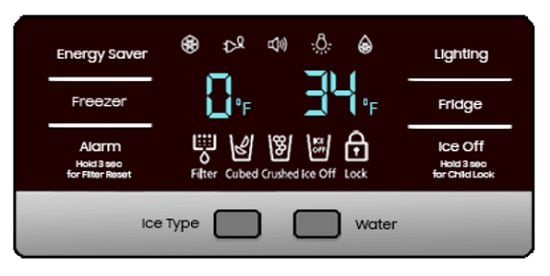
Many Samsung fridges include a reset option on the control panel. Locate the “Power Freeze” and “Power Cool” buttons. Press and hold both simultaneously for 10 seconds. The display may flash or beep, signaling the reset is in progress. Release the buttons and let the fridge restart. This method resets the electronic controls without unplugging the appliance.
When To Perform A Power Cycle
Perform a power cycle if the fridge is unresponsive or behaves oddly after a reset. Turn off the fridge using the control panel or unplug it. Wait at least five minutes before turning it back on. This cycle clears memory and resets the compressor and fan motors. Use this step only if other resets fail to fix the problem.

Credit: www.youtube.com
Troubleshooting Common Problems
Troubleshooting common problems after a power cut helps restore your Samsung fridge fast. Power outages can cause multiple issues. Identifying the problem saves time and money. Start with simple checks. Then move to detailed inspections.
Understanding typical symptoms guides you to the right fix. Look for power signs, unusual sounds, or blinking lights. Each clue points to specific causes. This section covers the main problems and how to handle them.
No Lights Or Display Issues
Check if the fridge has power. Test the outlet with a lamp or phone charger. Inspect the circuit breaker; reset if tripped. A blacked-out display means no electricity or a faulty control board. Try unplugging the fridge for five minutes, then plug it back in. This can reset the control panel. If lights stay off, call a technician for a control board check.
Compressor And Relay Sounds
Listen for clicking or humming near the compressor. No sound may mean the compressor is not working. Clicking sounds often come from a bad start relay. The compressor keeps food cold by running constantly. A faulty relay stops it from starting. This problem needs professional repair. Avoid forcing the fridge to run; it may cause more damage.
Blinking Lights And Error Codes
Blinking lights on the display signal errors. Check the fridge manual for code meanings. Error codes can indicate sensor or temperature issues. Unplug the fridge for a minute to reset the system. If blinking continues, note the code and contact support. Do not ignore error codes; they warn of serious faults needing repair.
Damaged Components To Watch For
Power cuts can cause hidden damage inside your Samsung fridge. Some parts may fail silently and stop the fridge from working properly. Knowing which components to check helps solve the problem faster. This section covers the key damaged parts to watch for after a power outage.
Main Control Board Faults
The main control board acts as the fridge’s brain. It controls temperature and compressor functions. A sudden power cut can cause electrical surges that damage this board. Faulty control boards may stop the fridge from starting or cause erratic behavior. Look for signs like no display, blinking lights, or no response when pressing buttons.
Inverter Board Damage
The inverter board manages the compressor speed to save energy. Power outages can create voltage spikes that harm this part. A damaged inverter board might cause strange noises or prevent the compressor from running. This leads to the fridge not cooling properly or stopping completely.
Compressor Start Relay Issues
The compressor start relay helps the compressor turn on. Power cuts may cause the relay to fail or get stuck. If the compressor does not start, the fridge will not cool. Common signs include clicking sounds without compressor noise or the fridge running but not cooling. Testing or replacing the relay often fixes this problem.

Credit: www.reddit.com
When To Call A Professional
Knowing when to call a professional is key after a power cut affects your Samsung fridge. Some issues require expert care to avoid costly repairs. Acting too late can worsen the problem. Early intervention helps save your fridge and food inside.
Simple fixes like resetting the circuit breaker or unplugging the fridge may work. But certain signs show the damage is serious. Understanding these signs helps you decide quickly.
Signs Of Serious Electrical Damage
Look for unusual noises like loud clicking or no sound at all. These may mean the compressor or control board is faulty. A burning smell or visible sparks are clear danger signs. The fridge not cooling despite power can also signal internal damage. Frequent tripping of breakers suggests electrical faults too. These signs need professional diagnosis and repair.
Avoiding Further Component Damage
Do not try to fix complex electrical parts yourself. Avoid unplugging and plugging the fridge repeatedly. Keep the fridge door closed to reduce strain on the cooling system. Turn off the fridge if you smell burning or see smoke. Unstable power can harm the compressor and electronics. Quick professional help stops damage from spreading.
Finding Reliable Repair Services
Choose technicians experienced with Samsung fridges. Check online reviews and ratings before booking. Confirm they use genuine Samsung parts for repairs. Ask about service guarantees and repair warranties. Local repair shops with good reputations offer faster support. Reliable service ensures your fridge works safely and lasts longer.
Preventing Future Power Cut Issues
Power cuts can cause damage to your Samsung fridge and disrupt its normal function. Preventing future issues helps keep your appliance safe and working. Taking simple steps protects your fridge from electrical problems and power interruptions.
Follow these tips to reduce the risk of damage after a power cut. Careful planning and maintenance ensure your fridge stays reliable and lasts longer.
Using Surge Protectors
Surge protectors shield your fridge from sudden voltage spikes. These spikes happen when power returns after an outage. A surge protector blocks extra voltage, stopping damage to electronic parts.
Choose a surge protector made for large appliances. Plug your Samsung fridge into it to add a layer of safety. This small device can save costly repairs later.
Regular Maintenance Tips
Keep your fridge clean and check it often. Clean the coils at least twice a year to help it run smoothly. Dust and dirt make the fridge work harder and use more power.
Check door seals for cracks or gaps. A poor seal wastes energy and strains the compressor. Replace damaged seals fast to avoid bigger problems.
Listen for unusual noises and watch for temperature changes. Early signs help you fix small issues before they grow.
Backup Power Solutions
Consider backup power to keep your fridge running during outages. A small generator or a UPS (uninterruptible power supply) works well. These options provide enough power to protect food and electronics.
Choose a backup that matches your fridge’s power needs. Test your backup regularly to ensure it works when you need it most. Backup power reduces stress and prevents food spoilage.
Frequently Asked Questions
How Do You Reset A Samsung Refrigerator After A Power Outage?
Restore power to the Samsung refrigerator. Press and hold the Power Cool and Power Freeze buttons for 10 seconds to reset. Check the circuit breaker if it still doesn’t work. Allow the fridge to stabilize for a few hours before use.
Contact a professional if issues persist.
How Do You Reset A Refrigerator After A Power Outage?
Reset a refrigerator after a power outage by unplugging it for 5 minutes. Then, plug it back in and turn it on. Check the circuit breaker and ensure power supply is stable. Press the reset button if your model has one.
Allow the fridge to cool properly before use.
What Buttons Do You Push To Reset A Samsung Refrigerator?
Press and hold the Power and Ice/Water buttons together for 10 seconds. Release to reset the Samsung refrigerator control panel.
Why Did My Samsung Fridge Suddenly Stop Working?
Your Samsung fridge may stop working due to a tripped circuit breaker, power outage damage, or a faulty control board. Check the power supply, reset the breaker, and inspect for damaged components like the compressor or electronic board. Professional repair might be necessary if problems persist.
Conclusion
A power cut can disrupt your Samsung fridge’s normal function. Start by checking the circuit breaker and power outlet. Try resetting the fridge’s control panel as a simple fix. Listen for unusual sounds like clicking or silence from the compressor.
These signs may mean internal parts need repair. Acting quickly helps prevent food spoilage. If problems persist, contact a professional technician. Taking these steps can restore your fridge’s operation safely and efficiently. Stay calm, and don’t ignore warning signs after a power outage.

Hi, I’m the lead researcher and appliance enthusiast behind RefrigeratorSolve. With years of hands-on experience troubleshooting cooling systems and testing home appliances, I am dedicated to bringing you honest reviews, energy-saving tips, and practical solutions to keep your refrigerator running perfectly.