A sudden pop from your Kenmore refrigerator can sound like a shelf has cracked, a panel has snapped, or something behind the freezer wall has broken. It may happen once after the compressor stops, several times during the night, or whenever the refrigerator enters a defrost cycle.
Fortunately, occasional popping noises are usually normal. The plastic liner, metal cabinet, cooling pipes, insulation, shelves, and other internal components repeatedly warm and cool. As these materials expand or contract, they may shift suddenly and produce a sharp pop.
A Kenmore refrigerator manual identifies contraction and expansion of the interior walls as a normal cause of popping. It also explains that defrost controls may click, refrigerant may gurgle, and water may sizzle or run into the drain pan during automatic defrosting.
However, repeated popping accompanied by weak cooling, heavy frost, fan scraping, leaking, electrical clicking, smoke, or a burning smell may indicate a problem that needs professional attention.
This guide explains why your Kenmore refrigerator makes popping noises, how to identify the likely source, which troubleshooting steps are safe to perform, and why the complete Kenmore model number matters before ordering a part or arranging a repair.
Quick Answer
Your Kenmore refrigerator is most likely making popping noises because its interior walls and cooling components are expanding or contracting as the temperature changes.
Other common causes include:
- The automatic defrost cycle starting or ending
- The compressor or temperature control switching
- Refrigerant moving through the cooling system
- Ice being released into the storage bin
- The water inlet valve filling the ice maker
- A water line vibrating against the refrigerator or wall
- The refrigerator being out of level
- Shelves, bins, bottles, or external panels shifting
- A door hinge or closing component moving
- Ice buildup interfering with a freezer fan
If the appliance maintains a stable temperature and the popping only happens occasionally, a repair is usually unnecessary.
Investigate further if the sound happens every few seconds, becomes progressively louder, or occurs with poor cooling, frost buildup, leaking, an error code, a hot plug, repeated breaker trips, or a burning smell.
Is It Normal for a Kenmore Refrigerator to Make Popping Noises?
Yes. Occasional popping, clicking, humming, gurgling, and rattling sounds are normal for many Kenmore refrigerators.
A refrigerator contains several systems that operate at different times:
- A compressor
- Evaporator and condenser fans
- An automatic defrost system
- Refrigerant pipes
- Temperature controls
- A water inlet valve
- An automatic ice maker
- Electronic dampers or control boards on some models
Kenmore refrigerator documentation explains that hard floors, walls, and cabinets can make normal operating sounds seem louder than they actually are. The same manual lists clicking from the defrost timer or temperature control, gurgling from refrigerant flow, popping from interior-wall movement, and sizzling from water contacting the defrost heater as expected sounds.
A normal popping noise usually has these characteristics:
- It occurs occasionally rather than continuously.
- The refrigerator and freezer remain cold.
- It lasts only a moment.
- It may happen during cooling or defrosting.
- It may occur when the ice maker operates.
- No persistent warning or error appears.
- There is no smoke, sparking, or burning smell.
- The frequency does not steadily increase.
The timing, pattern, and accompanying symptoms are more important than the volume of one isolated pop.
Normal Kenmore Popping Noise vs. a Possible Fault
| What You Notice | Most Likely Explanation | Recommended Action |
|---|---|---|
| An occasional pop from inside the cabinet | Normal expansion or contraction | No repair is usually needed |
| A pop during or after defrosting | Interior parts changing temperature | Monitor normal operation |
| A click when cooling starts or stops | Temperature control or defrost control | Usually normal |
| A bang followed by ice entering the bin | Ice-maker operation | Usually normal |
| Buzzing or clicking without a water connection | Ice-maker valve attempting to fill | Turn off the ice maker |
| Popping after moving the refrigerator | Poor leveling, wall contact, or a moving water line | Check the installation |
| Popping only when a door moves | Hinge, closing cam, gasket, or alignment | Inspect the door and level |
| Repeated clicking with poor cooling | Compressor, control, or electrical problem | Arrange professional diagnosis |
| Fast tapping or scraping in the freezer | Fan contacting ice | Request service |
| Popping with heavy frost | Defrost, airflow, or door-seal problem | Arrange diagnosis |
| Popping with smoke or a burning smell | Possible electrical failure | Disconnect power if it is safe |
Why Kenmore Refrigerator Troubleshooting Is Different
Kenmore is a brand rather than a single refrigerator-manufacturing platform. Different Kenmore models have been produced by different appliance manufacturers, so parts, wiring, compressor designs, ice makers, error codes, and service procedures may vary.
The first three digits of many Kenmore model numbers identify the manufacturing family. Common examples include:
| Kenmore Model Prefix | Common Manufacturing Platform |
|---|---|
| 106 | Whirlpool-built Kenmore refrigerators |
| 253 | Frigidaire or Electrolux-built Kenmore refrigerators |
| 795 | LG-built Kenmore refrigerators |
Sears PartsDirect advises using the complete model number because the prefix identifies the manufacturing platform while the remaining digits identify the exact configuration and compatible parts.
This distinction is important. A troubleshooting procedure for a 795-series Kenmore refrigerator may not apply to a 106- or 253-series model, even when the refrigerators look similar from the outside.
Always locate the full model number before:
- Ordering a fan, relay, sensor, or ice maker
- Following an error-code guide
- Attempting a reset
- Downloading a manual
- Testing an ice maker
- Removing a panel
- Scheduling warranty service
What Causes a Kenmore Refrigerator to Make Popping Noises?
The sound’s timing and location usually provide the best clues.
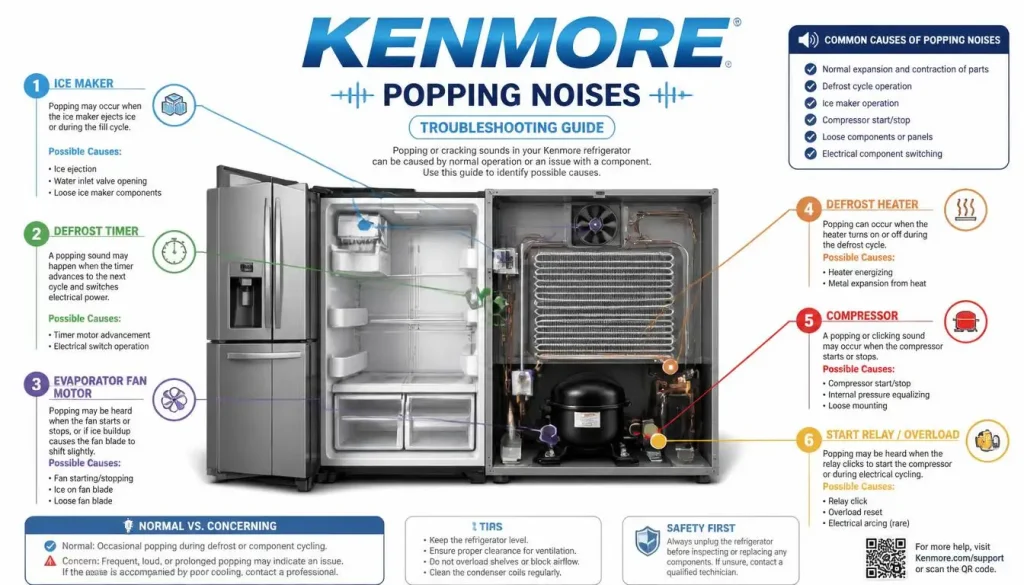
1. Interior Walls Expanding and Contracting
Thermal expansion and contraction are the most common causes of refrigerator popping noises.
The temperature inside the appliance changes throughout the day. It falls while the compressor is actively cooling and rises slightly when cooling pauses or automatic defrosting begins.
Plastic, metal, insulation, and cooling pipes do not respond to temperature changes at exactly the same rate. A panel or interior liner may remain under slight pressure until it suddenly shifts, creating a pop, crack, or snap.
You may notice this more often:
- During the first cooling cycle
- After changing the temperature setting
- After adding warm groceries
- After leaving a door open
- During hot weather
- Following a power outage
- During or after automatic defrosting
- When the home is quiet at night
Kenmore documentation specifically identifies contraction and expansion of the refrigerator’s interior walls as a cause of normal popping.
Does Thermal Popping Require Repair?
Usually, no.
If the refrigerator is cooling correctly and the sound is brief and occasional, replacing the compressor, control board, or fan is unlikely to stop it. The sound is being created by normal material movement rather than a failed component.
You may still be able to reduce how noticeable it sounds by leveling the appliance, providing the proper clearance, and ensuring that the cabinet does not touch nearby walls or cupboards.
2. The Automatic Defrost Cycle
Most frost-free Kenmore refrigerators periodically run an automatic defrost cycle.
During defrosting, the temperature around the evaporator rises enough to melt accumulated frost. As frost melts and the surrounding materials change temperature, you may hear:
- Popping
- Clicking
- Cracking
- Hissing
- Sizzling
- Gurgling
- Dripping
- Running water
A Kenmore manual states that the defrost timer may click when the cycle begins and ends. It also explains that water can sizzle when it reaches the defrost heater and may be heard running into the drain pan.
When Defrost-Related Noise May Indicate a Problem
Arrange an inspection if popping occurs with:
- Thick frost on the freezer’s rear wall
- A rapidly tapping or scraping fan
- Weak airflow from the vents
- A refrigerator compartment that is becoming warm
- Food beginning to thaw
- Water collecting beneath the drawers
- Water repeatedly leaking onto the floor
- The compressor running almost continuously
- A persistent error code
These symptoms may indicate a defrost heater, sensor, fan, drain, gasket, or airflow problem rather than harmless thermal movement.
3. The Defrost Timer or Temperature Control Is Clicking
A brief click or pop may come from a control switching the refrigerator on or off.
Depending on the model, the sound may come from:
- A mechanical thermostat
- An automatic defrost timer
- An electronic relay
- A damper motor
- A control board
- A compressor control device
Kenmore documentation states that the defrost timer clicks at the beginning and end of a defrost cycle and that the thermostat or refrigerator control may click while cycling on and off.
A single click followed by normal cooling is generally harmless.
Repeated clicking becomes more concerning when the compressor does not remain running or the refrigerator starts warming.
4. The Compressor Is Starting, Stopping, or Adjusting
The compressor circulates refrigerant through the cooling system.
Depending on the original manufacturer and refrigerator design, the compressor may operate at a fixed speed or adjust its output according to cooling demand.
Normal compressor-related sounds may include:
- A brief click
- A low hum
- Pulsating
- A change in pitch
- A soft thump
- A short pop as operation changes
Kenmore refrigerator documentation notes that a high-efficiency compressor may run longer than an older compressor and may produce pulsating or high-pitched sounds.
When Compressor Clicking May Be Abnormal
Pay attention if you hear a repeating pattern such as:
Click, pause, click, pause
and the refrigerator is not cooling.
Possible service-level causes include:
- A compressor start-device problem
- Compressor overheating
- An unstable power supply
- A control-board fault
- A damaged electrical connection
- A failing compressor
Do not remove the compressor terminal cover or test live wiring yourself. Compressor and electrical diagnosis require proper equipment and training.
5. Refrigerant Is Moving Through the Cooling System
Refrigerant changes pressure and state as it travels through the refrigerator’s sealed pipes and coils.
This may create:
- Gurgling
- Bubbling
- Hissing
- Light tapping
- Rattling
- Occasional popping
Kenmore refrigerator documentation identifies gurgling at the end of a cooling cycle as refrigerant flowing through the appliance. It also notes that refrigerant movement may contribute to rattling sounds.
These sounds are usually normal when the refrigerator is cooling properly.
The sealed refrigeration system is not a suitable DIY repair area. Do not cut, loosen, bend, heat, or puncture refrigerant tubing.
6. Ice Is Being Released Into the Storage Bin
An automatic ice maker can produce several noises during a normal cycle.
You may hear:
- A crack as cubes separate from the mould
- A click as the ejector moves
- A brief motor sound
- A bang as ice enters the storage bin
- A buzz as the water valve opens
Ice falling into an empty hard-plastic bin may sound much louder than expected.
Sears PartsDirect explains that after an ice maker releases its cubes, the water valve normally opens briefly to refill it. Constant buzzing or clicking, especially when cubes are stuck halfway out of the mould, can indicate an ice-maker jam rather than ordinary operation.
How to Check the Ice Maker
Temporarily turn off the ice maker using the switch, shutoff arm, or control-panel setting described in your model’s manual.
Monitor the refrigerator through several cooling cycles.
If the popping stops, check:
- Whether ice had been dropping into an empty bin
- Whether cubes are clumped together
- Whether a cube is stuck near the ejector
- Whether the storage bin is fully seated
- Whether the water supply is connected
- Whether the water line is kinked
- Whether the ice maker has been left on without water
Do not force the tray, ejector arms, motor, or gears by hand.
7. The Ice Maker Is On Without a Water Connection
An ice maker that is switched on without a working water supply may create buzzing, clicking, chattering, or popping-like sounds.
The inlet valve attempts to fill the ice maker, but no water enters.
A Kenmore refrigerator manual instructs owners to leave the ice-maker power switch off until the refrigerator has been connected to a water supply.
Check that:
- The household water valve is open.
- The refrigerator is connected to the supply line.
- The line is not crushed or kinked.
- The water filter is installed correctly.
- The ice maker is off when no water supply is available.
- No connection is leaking.
Do not dismantle the water inlet valve while the refrigerator remains connected to electricity and water.
8. The Water Line Is Vibrating
A water line can tap against the refrigerator, wall, floor, or nearby cabinet whenever the inlet valve opens or closes.
The resulting sound may be described as:
- A pop
- A knock
- A snap
- Chattering
- Rattling
- Hammering
One Kenmore installation manual instructs owners to arrange excess tubing so it does not vibrate against the rear of the refrigerator or the wall.
Inspect only the visible part of the line.
Make sure it is not:
- Trapped beneath the refrigerator
- Crushed against the wall
- Bent sharply
- Pulled tight
- Touching the compressor cover
- Striking a kitchen cabinet
- Leaking at a connection
Persistent water hammer, weak dispenser flow, or leaking may require a plumber or appliance technician.
9. The Refrigerator Is Not Level
An unlevel refrigerator can create or amplify popping, rattling, knocking, and door noises.
When the cabinet does not sit evenly:
- Interior panels may remain under uneven pressure.
- Shelves and bottles may shift.
- Doors may rise or drop.
- A freezer drawer may not sit squarely.
- Compressor vibration may transfer into the floor.
- The water line may strike the rear panel.
- Door gaskets may not seal correctly.
Kenmore troubleshooting documentation links vibration and rattling to a weak or uneven floor or leveling legs that need adjustment.
How to Check the Level
Use a spirit level and check:
- Side-to-side position
- Front-to-back position
- Whether the appliance rocks
- Whether all supporting feet contact the floor
- Whether the doors align
- Whether the freezer drawer closes smoothly
Follow your model-specific manual because adjustment procedures differ among top-freezer, side-by-side, bottom-freezer, and French-door models.
Do not use folded paper, loose cardboard, or unstable pieces of wood as a permanent leveling solution.
10. The Refrigerator Is Touching a Wall or Cabinet
A small internal sound can become much louder when vibration transfers into another surface.
Possible contact points include:
- The rear wall
- A kitchen cabinet
- Countertop trim
- A water pipe
- Another appliance
- The power cord
- The water supply tube
- Objects stored above or beside the refrigerator
Hard floors, walls, and cabinets can amplify ordinary refrigerator sounds.
Move the refrigerator slightly away from nearby surfaces and listen for a change.
Before moving it:
- Unplug it if access is safe.
- Protect the floor.
- Ask another person to help.
- Avoid pulling on the doors or handles.
- Make sure the water line has enough slack.
Required ventilation clearance varies by model, so use the measurements in your installation manual.
11. Shelves, Drawers, Bottles, or Bins Are Shifting
Sometimes the refrigerator creates a normal vibration, but another object turns it into a noticeable pop.
Check for:
- Glass bottles touching each other
- Containers resting against an interior wall
- A shelf that is not fully seated
- A loose door bin
- A crisper drawer that is out of position
- A freezer basket that is not installed correctly
- An ice bucket that is not fully inserted
- Objects stored on top of the refrigerator
- Food containers touching an air vent
Separate bottles and jars, reseat removable parts, and remove loose objects from the top of the appliance.
Do not block interior vents. Restricted airflow can contribute to uneven temperatures and longer cooling cycles.
12. The Evaporator Fan Is Striking Ice
A sound described as popping may actually be rapid tapping from a fan blade hitting ice.
Warning signs include:
- The sound comes from behind the freezer panel.
- It resembles a card hitting bicycle spokes.
- It changes when the freezer door opens.
- Frost is visible on the freezer’s rear wall.
- Airflow from the vents is weak.
- The refrigerator compartment is becoming warm.
- The sound becomes more frequent over time.
This is different from an occasional thermal pop.
Possible underlying causes include:
- A door that is not closing completely
- A damaged or dirty gasket
- Blocked airflow
- A defrost-system problem
- A blocked drain
- A faulty fan or sensor
Do not remove hidden ice with a knife, screwdriver, boiling water, heat gun, or other aggressive method. These can damage the liner, wiring, fan housing, insulation, or refrigerant tubing.
13. A Door Hinge or Closing Component Is Popping
If the pop occurs only when you open or close a door, the cooling system may not be responsible.
Possible causes include:
- An unlevel cabinet
- A hinge under strain
- A worn closing cam
- A sticky door gasket
- A misaligned French door
- A centre flap or mullion moving
- An overloaded door bin
- A freezer drawer rail shifting
- A door rubbing against cabinetry
Open each door slowly and watch for:
- A pop at the same point every time
- The door lifting or dropping
- Sideways movement
- A gasket folding
- A centre flap catching
- Contact with nearby furniture
Correct leveling and storage problems first. Avoid removing hinge covers containing wiring unless your model’s manual provides a specific owner procedure.
14. The Refrigerator Was Recently Moved
If the popping began after moving or cleaning the appliance, the cause may be installation-related rather than an internal failure.
The refrigerator may now be:
- Out of level
- Touching the wall
- Pinching the water line
- Resting on an uneven floor
- Pressing against cabinetry
- Operating with a shifted shelf or drawer
- Cooling down again after being unplugged
Check the level, clearance, water connection, door alignment, and removable parts.
A refrigerator that has recently been plugged in may also run longer while restoring its internal temperature. One Kenmore manual states that the appliance may take up to 24 hours to cool completely, although the exact time depends on the model and conditions.
15. The Refrigerator Is Recovering After a Power Outage
After power returns, the refrigerator must restore its normal temperature.
During this period:
- The compressor may run for longer.
- Fan speed may change.
- Refrigerant pressure may fluctuate.
- Cabinet materials may contract.
- Partially melted ice may shift or refreeze.
- Automatic controls may click as they restart.
Popping may temporarily become more noticeable because the internal temperature change is larger than usual.
Monitor cooling and avoid repeatedly disconnecting and reconnecting the appliance. Sears PartsDirect notes that refrigerator and freezer temperatures can take up to 24 hours to stabilise after power is restored.
Why Does My Kenmore Refrigerator Make Loud Popping Noises?
A refrigerator cabinet can amplify a small internal movement.
The hollow metal shell, plastic liner, insulation, floor, walls, and surrounding cabinets may act like a sound box. A minor panel shift can therefore sound like a much larger impact.
A normal pop may seem especially loud when:
- The home is quiet at night.
- The refrigerator is almost empty.
- Ice falls into an empty storage bin.
- The appliance is installed in a tight opening.
- The cabinet touches the wall.
- The floor is hard or uneven.
- The refrigerator has just completed defrosting.
- A significant temperature change has occurred.
- The appliance is cooling after installation or a power outage.
A loud sound does not automatically mean the compressor has failed.
Pay closer attention to:
- How frequently the sound occurs
- Whether the refrigerator still cools
- Where the sound originates
- Whether frost is developing
- Whether a fan is scraping
- Whether water is leaking
- Whether an error code appears
- Whether electrical warning signs are present
How to Locate the Source of Kenmore Refrigerator Popping Noises
Avoid ordering parts until you have identified a pattern.
Note When It Happens
Record whether the pop occurs:
- When cooling begins
- When the compressor stops
- During or after defrosting
- When ice drops into the bin
- After using the water dispenser
- When opening a door
- When closing a door
- After moving the refrigerator
- Following a power outage
- Every few seconds
- Only once or twice per hour
The timing can quickly eliminate several possible causes.
Identify the General Location
Inside the refrigerator compartment: Check shelves, bottles, drawers, vents, dampers, and the interior liner.
Inside the freezer: Consider the ice maker, ice bin, evaporator fan, frost buildup, baskets, and defrost cycle.
At the lower rear: Consider the compressor, condenser fan, water valve, refrigerant pipes, or wall contact.
At a door: Check the hinge, gasket, closing cam, centre flap, door bins, and alignment.
Behind the refrigerator: Look for a moving water line, trapped power cord, fallen object, or contact with the wall.
Do not remove electrical covers or place your hands near moving fans.
Check Whether Cooling Is Normal
Use an appliance thermometer if you are uncertain.
As a general food-storage target, many refrigerators are set around:
- Refrigerator compartment: 37°F or approximately 3°C
- Freezer compartment: 0°F or -18°C
Use the temperatures and control procedure specified in your exact Kenmore manual, as the recommended settings and display behaviour vary by model.
Check whether:
- Frozen food remains solid.
- Fresh food remains properly chilled.
- Cold air moves through the vents.
- The doors seal completely.
- Excessive frost is developing.
- The compressor stays running normally.
- An error code is displayed.
A popping noise without another symptom is more likely to be normal than a noise accompanied by rising temperatures.
Record the Sound
A short audio or video recording can help a technician identify an intermittent problem.
Try to capture:
- The popping sound
- The area where it is loudest
- The control-panel display
- Any visible frost
- Door movement
- Ice-maker activity
- Water-line vibration
Keep your hands and phone away from exposed wiring, moving fans, and compressor terminals.
How to Fix Kenmore Refrigerator Popping Noises
You cannot always eliminate normal thermal popping. You can, however, rule out installation, ice-maker, water-line, door, and vibration problems.
Step 1: Find the Complete Model Number
Do this before following a model-specific reset or ordering a part.
Many refrigerator model labels are located:
- On an interior side wall of the fresh-food compartment
- On the ceiling or floor of the fresh-food compartment
- Behind a lower drawer or crisper pan
- Behind the lower kick plate
Sears PartsDirect lists these as common refrigerator model-label locations.
Photograph the entire label, including:
- The complete model number
- The serial number
- Any suffixes or revision characters
Step 2: Confirm That the Refrigerator Is Cooling
Check the refrigerator and freezer temperatures.
Look for:
- Properly chilled food
- Solidly frozen food
- Airflow from the vents
- Fully closing doors
- No excessive frost
- No water leak
- No persistent error
- Normal compressor operation
If temperatures are rising, treat the cooling problem as the priority.
Step 3: Observe the Noise Pattern
Monitor the refrigerator through several operating cycles.
Note whether the pop occurs during:
- Compressor startup
- Compressor shutdown
- Defrosting
- Ice harvesting
- Water filling
- Door movement
- Temperature recovery
- Night-time operation
An occasional pop connected to cooling or defrosting usually does not require repair.
Step 4: Level the Refrigerator
Use a spirit level and follow your model’s installation instructions.
Make sure:
- The refrigerator does not rock.
- All supporting feet contact the floor.
- There is no significant side tilt.
- The doors align.
- The freezer drawer closes correctly.
- The cabinet does not lean against another surface.
Recheck the sound after several cooling cycles.
Step 5: Check the Clearance Around the Appliance
Inspect the rear, sides, and top.
Confirm that:
- The refrigerator is not touching the wall.
- The sides do not vibrate against cabinets.
- The power cord is not trapped.
- The water line is not striking another surface.
- No loose object has fallen behind the appliance.
- The required ventilation space is available.
Use the clearance measurements in the manual for your exact model.
Step 6: Rearrange Containers and Removable Parts
Separate bottles, jars, and hard containers.
Reseat:
- Shelves
- Door bins
- Crisper drawers
- Pantry drawers
- Freezer baskets
- Ice storage bins
- Removable trays
Remove loose objects from the top of the refrigerator.
Step 7: Test the Ice Maker
Temporarily turn off the ice maker according to your manual.
If the popping stops:
- Check whether ice had been falling into the bin.
- Confirm that the bin is correctly positioned.
- Look for visible ice clumps.
- Check for cubes caught near the ejector.
- Confirm that the water supply is connected.
- Inspect the visible line for kinks.
- Make sure the household valve is open.
Do not repeatedly reset or test-cycle the ice maker unless the instructions for your model specifically recommend it.
Step 8: Turn Off an Ice Maker That Has No Water Supply
If no water line is connected, leave the ice maker switched off.
This prevents the inlet valve from repeatedly attempting to fill the ice-making system. Kenmore documentation specifically instructs owners to keep the ice-maker switch off before the water connection is made.
Step 9: Inspect the Visible Water Line
Make sure the line is not:
- Kinked
- Crushed
- Trapped under a wheel
- Pressed against the wall
- Tapping against the rear panel
- Pulled too tightly
- Leaking
Persistent chattering, leaking, or weak dispenser flow may require professional attention.
Step 10: Inspect the Doors
Open and close each door slowly.
Look for:
- A pop at the same point
- A hinge lifting or dropping
- A gasket sticking
- A centre flap catching
- A door rubbing against cabinetry
- A bin striking an interior part
- A freezer drawer shifting
Correct leveling and storage problems before assuming that a hinge or rail requires replacement.
Step 11: Check for Frost and Fan Contact
Inspect the freezer’s rear interior panel.
Arrange service if you notice:
- Heavy frost
- Fast tapping
- Scraping
- Weak airflow
- Rising refrigerator temperatures
- Ice repeatedly returning
- A noise that changes when the freezer door opens
Do not apply direct heat or use sharp tools to remove hidden ice.
Step 12: Monitor the Appliance
If cooling remains normal and no installation fault is found, keep a short noise log.
Record:
- Time of the sound
- Frequency
- Location
- Compressor activity
- Ice-maker activity
- Door activity
- Compartment temperatures
- Any error code
This information can make a repair visit faster and more accurate.
Kenmore Model Prefixes and Troubleshooting Differences
The model prefix can help you understand which service information is most likely to apply.
Kenmore 106-Series Refrigerators
A model number beginning with 106 commonly indicates a Whirlpool-built Kenmore refrigerator.
Depending on the exact model, popping may be associated with:
- Cabinet expansion
- Defrost cycling
- Ice ejection
- Water-valve operation
- Compressor or fan adjustment
- A vibrating supply line
Use the full 106 model number when locating the manual or ordering parts.
Kenmore 253-Series Refrigerators
A 253 prefix commonly identifies a Frigidaire or Electrolux-built Kenmore refrigerator.
These models may use Frigidaire-style:
- Defrost components
- Fan motors
- Ice-maker parts
- Control systems
- Door components
- Error-code formats
Do not assume instructions for a 106- or 795-series refrigerator apply.
Kenmore 795-Series Refrigerators
A 795 prefix commonly identifies an LG-built Kenmore refrigerator.
Depending on the exact model, it may use:
- LG-style cooling systems
- Electronic fan controls
- Bottom-freezer or French-door layouts
- In-door ice-maker components
- Manufacturer-specific diagnostic codes
Some 795-series repairs and diagnostics resemble LG procedures, but you should still use the Kenmore manual and full model number rather than assuming that every LG instruction applies.
What if the Prefix Is Different?
Kenmore has used additional manufacturing platforms over time.
Do not guess the original manufacturer from the refrigerator’s appearance. Enter the full model number into Kenmore’s manual or service lookup, or contact support with the complete label information. Kenmore’s customer-care resources provide access to manuals, warranty information, service support, and product assistance.
Safe DIY Checks You Can Perform
You can safely:
- Confirm that the refrigerator is cooling.
- Measure compartment temperatures.
- Check the refrigerator with a spirit level.
- Correct contact with a wall or cabinet.
- Separate bottles and containers.
- Reseat shelves, bins, and drawers.
- Inspect the visible water line.
- Turn off an unused ice maker.
- Observe door and hinge movement.
- Look for visible frost or leaking.
- Record the sound.
- Locate the model and serial numbers.
Avoid attempting to:
- Open the sealed refrigeration system
- Test live compressor terminals
- Bypass a safety device
- Force ice-maker gears or ejector arms
- Remove hidden ice with a sharp object
- Apply direct heat to the freezer liner
- Replace a control board without diagnosis
- Continue using an appliance with electrical damage
Sealed-system work involving refrigerant should be handled by a qualified technician rather than attempted as a home repair.
When to Contact Kenmore Support or a Refrigerator Technician
Arrange professional diagnosis when:
- The popping is continuous or becoming louder.
- The refrigerator is no longer cooling properly.
- The compressor repeatedly clicks but does not stay on.
- A fan is scraping or striking ice.
- Heavy frost repeatedly develops.
- Water leaks from the appliance.
- A door no longer aligns or seals.
- The ice maker repeatedly jams.
- An error code remains active.
- One compartment becomes warm while the other remains cold.
- The sound continues after leveling and clearance checks.
- Electrical or sealed-system testing is required.
Stop using the refrigerator and disconnect it from power, provided it is safe to do so, if you notice:
- Smoke
- Sparks
- A burning or melting smell
- A damaged power cord
- A very hot or discoloured plug
- Repeated circuit-breaker trips
- An electrical shock or tingling sensation
Canadian fire-safety guidance advises unplugging an appliance that smokes or smells as though it is burning and having it repaired. UK electrical-safety guidance similarly recommends stopping use when plugs or sockets show burning, arcing, overheating, or unexplained breaker operation.
Do not reach behind the refrigerator if active sparking, smoke, water, or melted wiring makes the area unsafe.
For an imported Kenmore appliance in the UK or Australia, use the manual and rating label to find a local technician familiar with the refrigerator’s original manufacturing platform.
Frequently Asked Questions
Why Does My Kenmore Refrigerator Keep Making Popping Noises?
Widely spaced pops are usually caused by repeated cooling and defrost cycles. The interior walls and other materials expand or contract each time the temperature changes.
Investigate further if the sound happens every few seconds, the refrigerator becomes warm, or the compressor repeatedly tries to start.
Why Is My Kenmore Refrigerator Making Loud Popping Noises at Night?
The refrigerator may not be operating differently at night; the surrounding home is simply quieter.
Defrosting, thermal contraction, compressor cycling, refrigerant movement, and ice falling into an empty bin may all happen overnight. Walls, cabinets, and hard floors can also amplify normal sounds.
Why Is My New Kenmore Refrigerator Making Popping Noises?
A newly installed refrigerator undergoes substantial temperature changes during its initial cooling period. Interior liners, cabinet panels, shelves, insulation, and cooling components may pop as they contract.
Confirm that the appliance is level, has adequate clearance, and is not touching the wall. Some Kenmore manuals advise allowing up to 24 hours for complete cooling.
Why Does My Kenmore Refrigerator Pop During Defrosting?
The defrost cycle temporarily warms the evaporator area. Interior components may shift, frost may crack, water may reach the heater, and the defrost control may click.
Kenmore documentation identifies clicking, sizzling, running water, and popping as sounds that may occur around normal defrost and cooling operation.
Can a Kenmore Ice Maker Cause a Loud Pop?
Yes. Cubes separating from the mould and falling into an empty storage bin can sound like a pop or bang.
A brief valve buzz after the cubes drop may also be normal as the ice maker refills. Constant buzzing or clicking with stuck cubes may indicate an ice-maker jam.
Why Does My Kenmore Refrigerator Click Without a Water Connection?
If the ice maker remains switched on without a working water supply, the inlet valve may repeatedly attempt to fill it.
Turn off the ice maker until a suitable water connection is available.
Why Does My Kenmore Refrigerator Pop After Using the Water Dispenser?
The water inlet valve and supply line experience a pressure change during and after dispensing. A line touching the wall or rear panel may produce a knock or pop.
Inspect the visible line for kinks, movement, and contact with surrounding surfaces.
Why Does My Kenmore Refrigerator Pop After a Power Outage?
After power returns, the refrigerator must restore its internal temperature. The larger temperature change can increase expansion noises, while the compressor and fans may operate more actively.
Temperatures may require several hours to stabilise. Avoid repeatedly unplugging and reconnecting the appliance.
Why Does My Kenmore Refrigerator Pop After I Move It?
Moving the refrigerator may leave it out of level, trap the power cord, bend the water line, shift shelves, or place the cabinet against the wall.
Check the level, clearance, water connection, doors, bins, and drawers.
Why Does My Kenmore Refrigerator Pop When I Open the Door?
A pop linked specifically to door movement may come from a hinge, closing cam, gasket, centre flap, drawer rail, or alignment problem.
Check whether the refrigerator is level and whether the door rises, drops, sticks, or rubs.
Can a Kenmore Refrigerator’s Compressor Make a Popping Sound?
A compressor or its controls may create a brief click, thump, or change in pitch as cooling begins or ends. A high-efficiency compressor may also run longer and sound different from an older design.
Repeated clicking combined with cooling failure requires professional diagnosis.
Does the Kenmore Model Prefix Really Matter?
Yes. Kenmore refrigerators have been manufactured on different platforms. Common examples include 106 for Whirlpool-built models, 253 for Frigidaire or Electrolux-built models, and 795 for LG-built models.
The prefix affects compatible parts and troubleshooting procedures, but you should always use the complete model number.
Can I Completely Stop My Kenmore Refrigerator From Popping?
You may be able to eliminate sounds caused by poor leveling, wall contact, loose containers, a moving water line, an unconnected ice maker, or door misalignment.
Normal thermal popping cannot always be eliminated because it results from materials responding to temperature changes.
Should I Reset My Kenmore Refrigerator Because It Pops?
Usually not.
Resetting will not stop normal expansion, defrosting, refrigerant flow, or ice-drop noises. It may also erase an error code that could help diagnose an actual problem.
Only use a reset procedure written for your complete model number and a specific fault.
Should I Unplug a Kenmore Refrigerator That Makes Popping Noises?
An occasional pop with normal cooling does not normally require unplugging the refrigerator.
Disconnect it if the sound occurs with smoke, sparks, a burning smell, a damaged cord, an overheating outlet, an electrical shock, or repeated breaker trips.
How Long Will a New Kenmore Refrigerator Make Popping Noises?
There is no fixed period that applies to every Kenmore model.
The frequency often decreases after the refrigerator completes its initial cooling cycles and begins operating under stable conditions. Persistent, worsening, or continuous popping should be investigated.
Final Thoughts
So, why does your Kenmore refrigerator make popping noises?
In most cases, the sound comes from the interior walls and cooling components expanding or contracting as temperatures change. Automatic defrosting, compressor operation, refrigerant flow, ice production, water-valve operation, poor leveling, and contact with nearby surfaces can create additional pops, clicks, and knocks.
Begin by confirming that the refrigerator is cooling properly. Identify when and where the sound occurs, find the complete model number, level the appliance, provide the correct clearance, separate containers, inspect the visible water line, and observe the ice maker and doors.
The model number is particularly important with Kenmore refrigerators because different models may be built on Whirlpool, Frigidaire/Electrolux, LG, or other manufacturing platforms. Never order parts or follow a detailed repair procedure based only on the Kenmore name.
An occasional pop with stable temperatures is usually harmless. Continuous popping accompanied by cooling failure, heavy frost, fan scraping, leaking, persistent error codes, smoke, a burning smell, or electrical problems requires professional attention.

Hi, I’m the lead researcher and appliance enthusiast behind RefrigeratorSolve. With years of hands-on experience troubleshooting cooling systems and testing home appliances, I am dedicated to bringing you honest reviews, energy-saving tips, and practical solutions to keep your refrigerator running perfectly.