
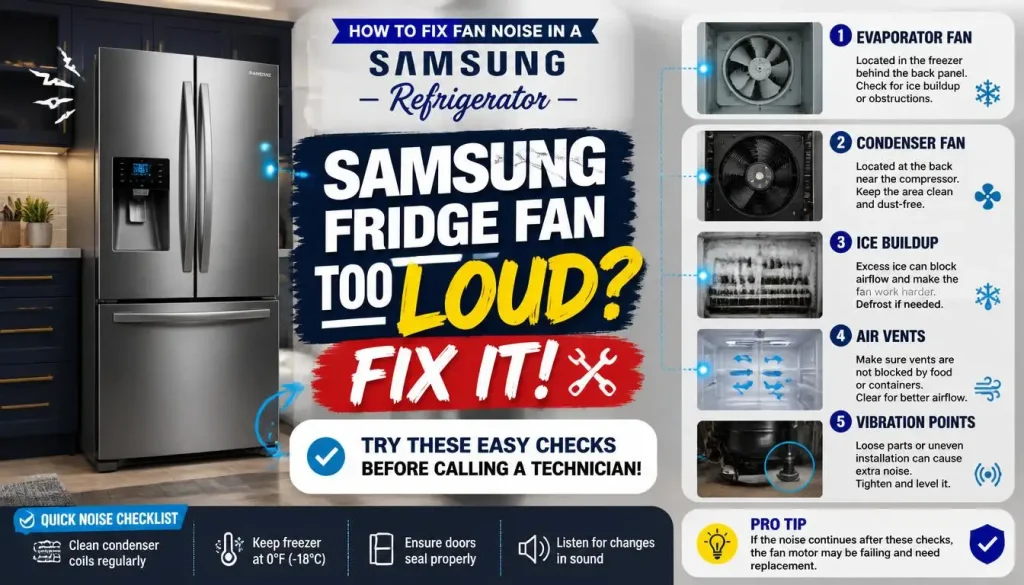
A noisy refrigerator can be annoying, but the sound can also tell you a lot about what is wrong. If your Samsung refrigerator is making a loud buzzing, grinding, scraping, or whirring noise, the cooling fan is one of the first parts to check.
A particularly useful clue is what happens when you open the refrigerator door. If the noise stops almost immediately, the sound may be coming from an internal evaporator fan. Ice buildup around the fan is a common reason this happens. Other possible causes include blocked air vents, poor door sealing, improper leveling, a damaged fan blade, or a failing fan motor.
Start with the simple checks below before taking anything apart. Many Samsung refrigerator fan noise problems can be narrowed down without special tools.
Quick Answer: What Usually Causes Samsung Refrigerator Fan Noise?
Samsung refrigerator fan noise is commonly linked to one of these problems:
- Ice or frost touching the evaporator fan
- Food or another obstruction interfering with airflow
- A refrigerator that is not properly level
- A door that is not sealing correctly
- Blocked internal air vents
- A loose or damaged fan blade
- A worn evaporator fan motor
- A fan that has frozen and cannot turn normally
Samsung specifically notes that fan noise caused by ice can stop when the refrigerator door is opened because the internal fan stops running when the door is open.
If that matches what your refrigerator is doing, pay close attention to the ice and defrost sections below.
Is Samsung Refrigerator Fan Noise Normal?
Not every sound coming from a refrigerator means something is broken.
Modern refrigerators use fans, compressors, refrigerant flow, valves, and automatic controls. That means some humming, airflow, clicking, or light whirring during normal operation can be expected. Samsung also explains that many refrigerator noises that initially sound unusual are part of normal operation.
Normal Samsung Refrigerator Fan Sounds
A soft airflow or low whirring sound may simply be the refrigerator circulating cold air.
The sound may change as the cooling system starts and stops. You may also notice it more when your kitchen is quiet.
A normal fan sound should not usually sound like something is scraping, grinding, or repeatedly hitting another object.
Signs the Fan Noise May Not Be Normal
Take a closer look if you notice:
- Loud grinding or scraping
- Buzzing that becomes unusually loud
- A sound that suddenly started after months of normal operation
- Noise that stops every time you open the refrigerator door
- Visible frost or ice inside the refrigerator
- Fan noise combined with poor cooling
- A fan-related error code
- Noise that keeps returning after defrosting
Those symptoms make an obstruction, ice buildup, or fan problem more likely.
Where Is the Fan Noise Coming From?
Before trying to fix anything, identify where the sound is loudest.
This simple step can prevent you from troubleshooting the wrong component.
Fan Noise From Inside the Refrigerator Compartment
If the sound seems to come from behind the rear interior panel and stops when you open the door, the evaporator fan deserves attention.
This fan moves cold air through the refrigerator. Ice forming around it can contact the spinning blades and create a buzzing, grinding, or scraping noise. Samsung uses the door-open test as part of its own fan-noise troubleshooting guidance.
Fan Noise From the Freezer
A noisy Samsung freezer fan can have similar causes.
Ice may build around the freezer fan, the fan may become obstructed, or the motor may stop turning correctly. Samsung identifies frozen or failed fans as possible causes of fan-related refrigerator error conditions.
Look for visible frost as well as changes in freezer temperature or airflow.
Noise From the Back or Bottom of the Refrigerator
If opening the refrigerator door does not change the sound, the noise may not be coming from the internal evaporator fan.
Listen near the rear and lower portion of the refrigerator instead. Depending on the model, the source could be another cooling component, vibration, or the compressor area.
Do not assume every buzzing or humming sound is a bad fan. First identify the location and whether opening the door changes it.
Why Is My Samsung Refrigerator Fan Making Noise?
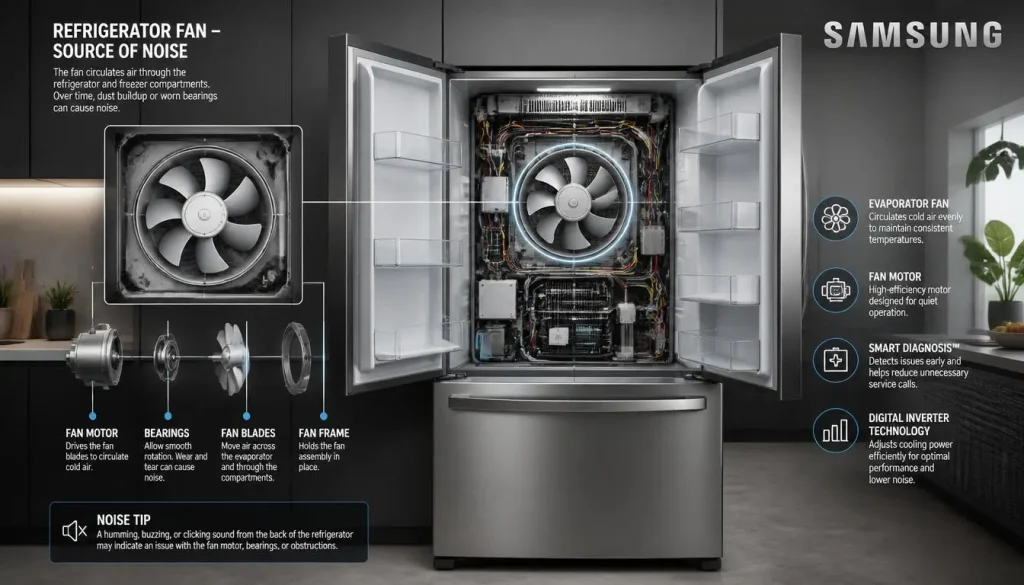
Several different problems can produce similar sounds.
Ice Buildup Around the Evaporator Fan
This is one of the most important causes to rule out.
Moisture that enters the refrigerator can freeze around the evaporator area. Once enough ice accumulates, the fan blades may begin touching it.
Samsung specifically describes a fan-hitting-ice condition that can stop when the door is opened.
Something Is Obstructing the Fan
The fan needs room to rotate freely.
Ice is a common obstruction, but a damaged fan housing or another internal problem can also interfere with movement.
If you eventually access the fan area, disconnect the refrigerator from power first. Do not reach toward a fan that could start unexpectedly.
The Refrigerator Is Not Level
A refrigerator that is not positioned correctly can create vibration and may contribute to abnormal fan noise.
Samsung recommends checking refrigerator leveling when troubleshooting fan sounds.
Blocked Air Vents
Packing food tightly against the rear vents restricts cold-air circulation.
That can affect temperature control and contribute to frost problems. Leave reasonable space around the internal air vents instead of pushing containers and food directly against them.
Samsung includes proper airflow among its recommended checks for refrigerator fan noise.
Door Seal Problems
A damaged, dirty, or poorly sealing door gasket can allow warm, humid air inside.
That moisture can eventually turn into frost. Samsung notes that doors that do not close or seal correctly can contribute to frost formation and cooling problems.
A Damaged Fan Blade
A cracked, bent, loose, or misaligned blade may create repetitive clicking, scraping, or vibration.
If all ice has been removed but the fan still makes a mechanical noise, the blade and fan assembly may need professional inspection.
A Failing Evaporator Fan Motor
A worn fan motor may become noisy, turn inconsistently, or stop completely.
If there is no ice or obstruction and the noise continues, the motor itself becomes a stronger possibility.
How to Fix Fan Noise in a Samsung Refrigerator
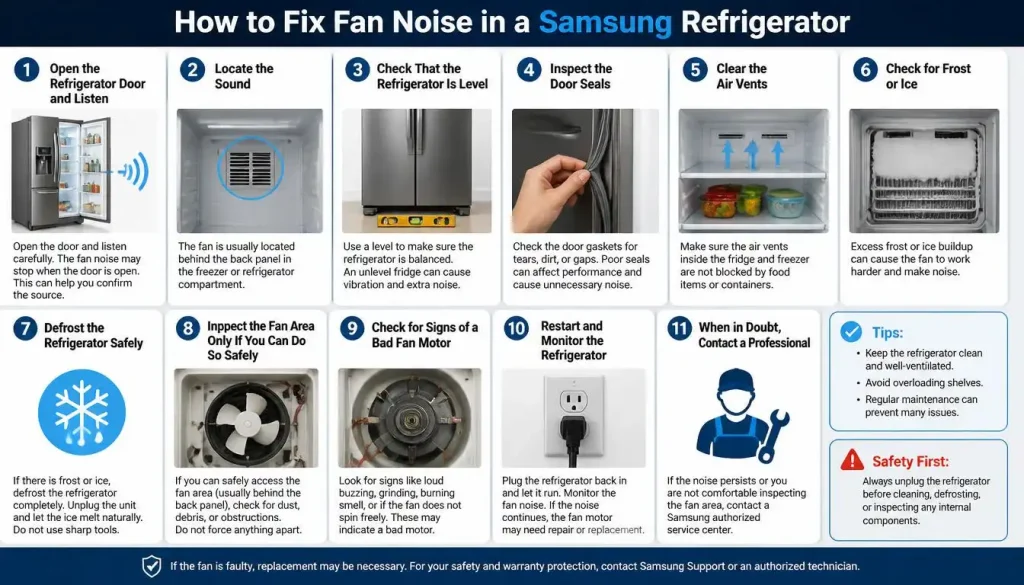
Work through these steps in order. Starting with the easiest checks can save you from unnecessary disassembly.
Step 1: Open the Refrigerator Door and Listen
While the noise is happening, open the refrigerator door.
Does it stop?
If yes, an internal cooling fan is a likely source because Samsung refrigerator fans can stop automatically when the door opens.
If the sound continues unchanged, investigate where else it may be coming from before assuming the evaporator fan is bad.
Step 2: Locate the Sound
Listen carefully around:
- The rear interior wall of the refrigerator
- The freezer compartment
- The lower rear of the appliance
- The compressor area
You are trying to determine whether the noise is inside the cabinet or behind the refrigerator.
Step 3: Check That the Refrigerator Is Level
Make sure the refrigerator is stable and properly positioned.
It should not rock when gently pressed. Check the adjustable feet and follow the leveling instructions for your specific Samsung model.
Samsung includes leveling among the first checks for fan-noise complaints.
Step 4: Inspect the Door Seals
Open each door and look around the gasket.
Check for:
- Food particles
- Sticky residue
- Twisted sections
- Gaps
- Tears
- Areas that do not contact the cabinet properly
Clean dirty seals carefully and make sure food or containers are not preventing the door from closing.
Warm air entering through a poorly closed door can create moisture and frost inside the refrigerator.
Step 5: Clear the Air Vents
Look at the vents inside the refrigerator and freezer.
Move food away from them so cold air can circulate. Avoid overpacking the refrigerator, particularly around the back wall.
This is one of the simplest checks and is worth doing before assuming a component has failed.
Step 6: Check for Frost or Ice
Look for:
- Frost on the rear interior panel
- Ice around vent openings
- Unusual frost in the freezer
- A scraping noise from behind the panel
- Noise that stops when the door opens
These symptoms can point toward ice around the evaporator fan.
Do not chip ice away with a knife, screwdriver, or other sharp object. Doing so can damage internal refrigerator parts.
Step 7: Defrost the Refrigerator Safely
If ice buildup appears to be causing the fan noise, a manual defrost can remove the ice and help confirm the diagnosis.
A safe basic approach is to:
- Move perishable food somewhere cold.
- Turn off and unplug the refrigerator.
- Open the doors.
- Place towels around the refrigerator to catch water.
- Allow the ice to melt naturally.
- Clean up the water.
- Restore power after the refrigerator has fully defrosted.
Do not try to speed up the process with a hair dryer, heat gun, or another external heat source. Samsung specifically warns that external heat can damage the refrigerator.
Also remember that defrosting may remove the noise without repairing its original cause. Samsung warns that fan-on-ice noise can return if the underlying problem is not corrected.
Step 8: Inspect the Fan Area Only If You Can Do So Safely
If your refrigerator has fully defrosted but still makes fan noise, an obstruction or damaged fan assembly may be involved.
Internal panel removal differs significantly between Samsung models. Do not force a panel off or copy disassembly instructions for a different model.
If access requires electrical testing, wiring work, or significant disassembly, professional service is the safer choice.
Step 9: Check for Signs of a Bad Fan Motor
After all visible frost is gone, listen again.
A failing fan motor becomes more likely if:
- Grinding continues without ice present
- The fan repeatedly starts and stops abnormally
- Airflow is weak
- The fan does not run when it should
- Cooling performance has also dropped
- A fan error returns after defrosting
At that point, replacing a motor may be necessary, but the correct part and procedure depend on the exact model number.
Step 10: Restart and Monitor the Refrigerator
After completing the basic checks, reconnect the refrigerator and allow normal operation to resume.
Listen for the original sound.
If the noise has disappeared and does not return, an airflow, leveling, door, or temporary frost issue may have been involved.
If it quickly comes back, especially after a full defrost, there is probably an underlying problem that still needs attention.
Samsung Refrigerator Fan Noise Stops When Door Opens
This is one of the strongest clues in refrigerator fan troubleshooting.
When you open the door, the refrigerator can stop its internal circulation fan. Therefore, a buzzing, grinding, or whirring noise that disappears immediately when the door opens can point toward an internal fan rather than the compressor.
Samsung specifically describes this behavior in its fan-noise guidance.
Why Does Opening the Door Stop the Noise?
The cooling fan does not need to keep blowing air in the same way while the refrigerator door is open.
When the fan stops, anything touching the blade stops making noise too.
That is why a door-open test can help identify a fan that is rubbing against ice or another obstruction.
Why Does the Noise Start Again When the Door Closes?
After the door is closed, the fan can resume operation.
If ice is touching the blades, the buzzing or grinding may return with it.
This does not automatically prove that the fan motor is defective. The motor may be working normally while its blades are simply hitting ice.
Samsung Refrigerator Fan Hitting Ice
A fan hitting ice often creates a rhythmic buzzing, scraping, grinding, or rough whirring sound.
You may notice that it:
- Gets louder over time
- Comes from behind the refrigerator’s inner rear panel
- Stops when the door opens
- Returns after the door closes
- Temporarily disappears after defrosting
Samsung confirms that ice buildup around a refrigerator fan can produce this type of noise.
How to Confirm Ice May Be Touching the Fan
Look for frost around the back wall or vents.
Then perform the door-open test.
If the sound stops with the door open and you can also see frost, ice around the evaporator area becomes a strong possibility.
How to Remove the Ice Safely
Use a complete manual defrost rather than trying to chip away hidden ice.
Unplug the refrigerator, open the doors, protect the floor with towels, and allow the ice to melt naturally.
Avoid hair dryers and other heating devices.
What If the Ice Comes Back?
Repeated icing should not be treated as a normal condition.
A manual defrost removes existing ice, but Samsung notes that it does not necessarily correct whatever caused the ice to form. If the same fan noise returns, service may be needed to find and repair the underlying issue.
Why Does Samsung Refrigerator Fan Noise Come Back After Defrosting?
If defrosting fixes the noise for a few days or weeks and then it returns, pay attention.
The returning sound suggests that ice may be forming again or that the fan itself has another problem.
Possible areas that may need further diagnosis include:
- Door sealing problems allowing moisture inside
- Repeated frost formation
- An issue within the automatic defrost system
- A fan motor problem
- A damaged fan blade or surrounding housing
Do not repeatedly defrost the refrigerator and assume the underlying fault has been repaired. Samsung recommends service when fan-on-ice noise returns because defrosting alone may provide only temporary relief.
What Different Samsung Refrigerator Fan Noises Mean
The type of sound can help narrow down what to check first.
Grinding or Scraping Noise
A grinding or scraping sound can happen when a rotating fan blade contacts ice or another obstruction.
Start with the door-open test and check for visible frost.
Buzzing Noise
A louder-than-usual buzzing sound may come from a fan struggling against ice or another restriction.
First identify whether it stops when the refrigerator door opens.
Rattling Noise
Rattling may come from vibration, poor leveling, a loose item, or another moving component.
Check that the refrigerator is stable and that nothing outside or inside the cabinet is vibrating against another surface.
Whirring Noise
A light, steady whirring sound can be normal fan operation.
A suddenly loud or rough whirring sound, especially one that stops when the door opens, deserves further investigation.
Clicking Noise
Clicking is not automatically a fan problem.
Listen carefully to determine where it originates before replacing anything.
Samsung Refrigerator Fan Making Noise and Not Cooling
Fan noise becomes more important when it appears together with poor cooling.
The evaporator fan helps distribute cold air through the refrigerator. If it cannot move air normally because it is blocked, frozen, or not operating correctly, cooling performance may be affected.
However, a Samsung refrigerator that is not cooling can have causes unrelated to the fan as well. Samsung recommends checking settings, door seals, refrigerator use, and other basic cooling conditions when diagnosing temperature problems.
If your refrigerator is warm and you also hear abnormal fan noise:
- Check whether the doors close properly.
- Make sure the air vents are clear.
- Look for heavy frost.
- Perform the door-open noise test.
- Check for fan-related error codes.
- Arrange service if cooling does not return.
Food safety matters here. Do not leave temperature-sensitive food in a refrigerator that is no longer keeping it safely cold.
How to Tell if a Samsung Refrigerator Fan Motor Is Bad
Do not replace the fan motor based on noise alone.
Ice touching a perfectly functional fan can sound surprisingly severe.
A failing fan motor becomes more likely when:
- The refrigerator has been completely defrosted but the fan remains noisy
- The blade is unobstructed but does not turn normally
- The motor makes a persistent mechanical grinding sound
- The fan fails to run
- Cooling or airflow remains poor
- A fan error returns after the refrigerator has been defrosted
Before ordering a replacement, locate the full model number of your refrigerator. Samsung uses different fan assemblies and access procedures across its refrigerator range.
Samsung Refrigerator Fan Noise With 22E or 22C Error
If your Samsung refrigerator displays 22E or 22C, the error is associated with the refrigerator fan.
Samsung says the condition may be related to a fan issue or a door that has been left open. Its guidance recommends allowing the unit to defrost with the doors open and requesting service if the error returns.
Do not simply clear the code and ignore recurring symptoms.
If 22E or 22C returns together with grinding, frost, or poor cooling, the refrigerator needs further diagnosis.
Some Samsung models may also use 21E for a freezer-fan-related error. Samsung describes frozen fans, motor faults, and door-related frost conditions as possible causes.
When Should You Replace the Samsung Refrigerator Fan?
Fan replacement may be appropriate when testing confirms the motor or fan assembly itself is defective rather than simply blocked by ice.
Possible signs include:
- Broken or damaged fan blades
- Persistent mechanical noise after a complete defrost
- A motor that cannot rotate properly
- Fan failure combined with weak airflow
- A recurring fan error after basic troubleshooting
Replacement should be based on the exact Samsung model.
Do not buy a fan simply because another refrigerator with a similar appearance uses it.
When to Call Samsung or an Appliance Repair Technician
Basic troubleshooting is reasonable for many noise problems, but there is a point where DIY work should stop.
Arrange professional service if:
- Fan noise returns after a complete defrost
- Heavy frost keeps coming back
- The refrigerator is not cooling properly
- The fan will not run
- A 22E, 22C, or other fan error keeps returning
- Electrical testing is required
- Internal wiring or sealed components need inspection
- You are not comfortable removing internal refrigerator panels
- The refrigerator may still be covered by warranty
Samsung specifically recommends service for recurring fan-on-ice problems because removing the ice does not necessarily repair the cause.
How to Prevent Samsung Refrigerator Fan Noise
You cannot prevent every fan motor failure, but good refrigerator use can reduce avoidable frost and airflow problems.
Keep the Air Vents Clear
Do not push food tightly against ventilation openings.
Leave enough room for cold air to circulate throughout the refrigerator and freezer.
Make Sure the Doors Close Completely
Check for bottles, containers, shelves, or food packages preventing a door from closing.
A door that remains slightly open allows warm, humid air into the refrigerator and can contribute to frost.
Keep the Door Gaskets Clean
Wipe away food residue and dirt so the gasket can make good contact with the cabinet.
Replace a damaged gasket when it can no longer form a proper seal.
Keep the Refrigerator Properly Level
A stable, correctly positioned refrigerator reduces unnecessary vibration and is one of Samsung’s recommended checks when investigating fan noise.
Deal With Repeated Frost Early
A small amount of unusual frost can be an early warning.
If frost repeatedly appears around the same rear panel and fan noise follows, investigate the cause instead of waiting until the fan becomes completely obstructed.
FAQs About Samsung Refrigerator Fan Noise
Why is my Samsung refrigerator making a loud fan noise?
A loud Samsung refrigerator fan may be hitting ice, rubbing against an obstruction, vibrating because of positioning, or developing a motor problem. If the noise stops when you open the refrigerator door, start by investigating the internal evaporator fan and possible ice buildup.
Why does my Samsung refrigerator fan noise stop when I open the door?
The internal cooling fan can stop when the refrigerator door opens. If the fan blades are hitting ice, the noise stops at the same time. Samsung specifically uses this symptom when describing fan-on-ice noise.
Why does my Samsung refrigerator make noise when the door is closed?
Closing the door allows the internal fan to resume operation. If ice or another obstruction is contacting the fan, the noise may start again shortly after the door closes.
Why is my Samsung refrigerator fan hitting ice?
Ice around the fan means moisture has frozen near the evaporator area. Poor door sealing and warm air entering the refrigerator can contribute to frost formation. If the ice repeatedly returns after a full defrost, further diagnosis is needed.
Will defrosting a Samsung refrigerator stop fan noise?
It can if ice is touching the fan. However, Samsung warns that manual defrosting may only remove the immediate ice buildup. If the original cause remains, the noise can return.
Can I use a hair dryer to defrost my Samsung refrigerator?
No. Samsung specifically warns against using a hair dryer or another external heat source to accelerate manual defrosting because it can damage the refrigerator. Let the ice melt naturally instead.
How do I know if my Samsung refrigerator evaporator fan is bad?
Suspect the fan motor more strongly if the refrigerator is fully defrosted, nothing is touching the blade, and the fan still grinds, fails to run, or produces poor airflow. A recurring fan error can also indicate that professional diagnosis is needed.
Why does my Samsung refrigerator fan noise keep coming back?
If the noise disappears after defrosting and later returns, ice may be building around the fan again. Samsung advises that manual defrosting may not correct the underlying cause of recurring fan-on-ice noise.
What does Samsung refrigerator error 22E or 22C mean?
Samsung identifies 22E and 22C as refrigerator fan errors. The problem may involve the fan or conditions created by a door being left open. If defrosting does not resolve the problem or the error returns, Samsung recommends requesting service.
Final Thoughts
If your Samsung refrigerator fan is making noise, start with one simple test: open the refrigerator door while the noise is happening.
When the sound immediately stops, an internal fan is a strong place to investigate. Check the refrigerator’s level, door seals, air vents, and visible frost before assuming the fan motor needs replacement.
Ice buildup is especially important because the fan can be completely functional while its blades are striking ice. A manual defrost may temporarily solve that problem, but recurring ice or fan noise should not be ignored.
If the sound returns after defrosting, cooling becomes unreliable, or a fan error appears, the refrigerator may need professional diagnosis rather than another temporary fix.

Hi, I’m the lead researcher and appliance enthusiast behind RefrigeratorSolve. With years of hands-on experience troubleshooting cooling systems and testing home appliances, I am dedicated to bringing you honest reviews, energy-saving tips, and practical solutions to keep your refrigerator running perfectly.






One Response