Introduction to Samsung Mobile Apps in Refrigerator
Evolution of Smart Appliances
The kitchen has come a long way, evolving from basic cooking spaces to tech-savvy environments that simplify our daily routines. Among these advancements, smart appliances have emerged as game-changers, with Samsung leading the charge in pushing boundaries.
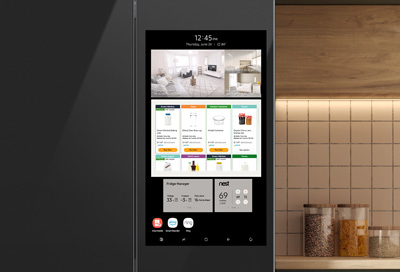
Imagine opening your refrigerator and finding a screen that connects you to a world of information. This is not just a dream; it is now a reality thanks to Samsung’s innovative mobile apps. These apps bring a suite of features right to your fingertips, seamlessly integrating with your lifestyle.
Key Milestones in the Evolution of Smart Appliances:
- Early Innovations: Initial smart appliances focused on remote control functionalities.
- Wi-Fi Connectivity: The introduction of Wi-Fi-enabled features opened up doors to communication with mobile devices.
- App Integration: Companies like Samsung began to integrate smart apps, providing tailored experiences for users.
With each technological advancement, the kitchen becomes more efficient and enjoyable, transforming meal preparation into a smart, interactive experience.
This evolution sets the stage for exploring the specific benefits of using Samsung mobile apps in refrigerators.
Benefits of Using Samsung Mobile Apps
Access to Recipes and Meal Planning
As smart technology continues to reshape our kitchens, one standout feature of Samsung mobile apps for refrigerators is their ability to provide users with access to a wealth of recipes and meal-planning resources.
Picture this: you come home after a long day and open your fridge, only to realize you’re unsure of what to cook. This is where the power of apps shines through!
With just a few taps, users can explore curated recipes that utilize ingredients already available in their fridge. This not only reduces food waste but also fosters creativity in the kitchen.
Benefits of Accessing Recipes via Samsung Apps:
- Custom Recipe Suggestions: The app suggests meals based on the items currently stocked in your refrigerator.
- Meal Planning Assistance: Create weekly meal plans that cater to dietary preferences and nutritional needs.
- Shopping Lists: Generate a shopping list directly from the selected recipes, ensuring nothing is missed when you’re at the grocery store.
By seamlessly integrating meal ideas with the contents of your fridge, these apps transform dinner dilemmas into delightful culinary adventures. With easy access to information, users can unleash their inner gourmet cook without the stress!

How to Download and Install Samsung Mobile Apps
Step-by-Step Guide
Once you discover the amazing benefits of Samsung mobile apps, you’ll want to jump right into downloading and installing them!
Fortunately, Samsung makes this process straightforward, ensuring you can enjoy enhanced functionality with ease. Let’s break it down into simple steps.
Step-by-Step Installation Process:
- Check Device Compatibility: Ensure your smartphone is compatible with Samsung apps by confirming it has the latest software updates.
- Open the App Store: On your smartphone, navigate to the Google Play Store or Samsung Galaxy Store.
- Search for the App: Use the search bar to type in “Samsung Family Hub” or any other relevant app.
- Select and Download: Choose the app from the results and click “Install”.
- Log In/Create an Account: Once installed, open the app and follow the prompts to log in or create a Samsung account.
- Connect to Your Refrigerator: Follow the in-app instructions to sync your mobile device with your Samsung refrigerator.
With these steps, you can easily set up the apps and start reaping the benefits in your kitchen. Personal experience shows that once the app is linked, it opens up a world of convenience and organization that simplifies meal planning and grocery management!
Top Samsung Mobile Apps for Refrigerator
Family Hub
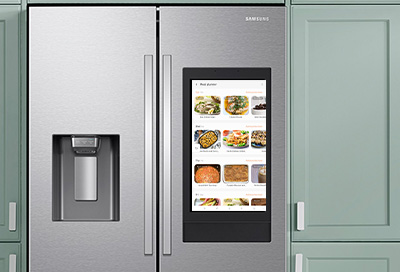
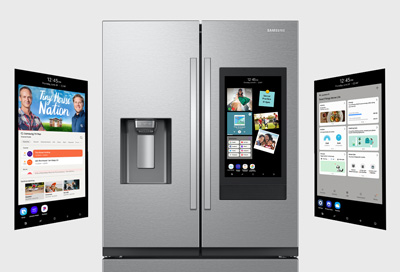
One of the standout offerings from Samsung is the Family Hub app, which truly redefines how families interact with their kitchen appliances. Imagine a touch screen on your refrigerator acting as a central hub for your home!
Features of Family Hub:
- Real-Time Notifications: Get alerts for food that’s nearing expiration or reminders about meals you planned.
- Calendar Sharing: Sync family schedules to coordinate meal times or grocery shopping days effortlessly.
- Recipe Recommendations: Based on what’s inside your fridge, the app suggests recipes, making weeknight dinners a breeze.
Grocery Management Apps
In addition to Family Hub, Samsung also offers various Grocery Management Apps that further enhance your shopping efficiency. Personal use of these apps has showcased how they streamline grocery trips.
Key Features of Grocery Management Apps:
- Inventory Tracking: Keep tabs on what you have at home, sorting items by categories like dairy or frozen foods.
- Automated Shopping Lists: Automatically generate a shopping list based on your usage and planned meals.
- Recipe Shopping Integration: Easily add ingredients from your favorite recipes to your grocery list.
With both Family Hub and grocery management apps, Samsung elevates your kitchen experience, allowing users to plan and manage meals intelligently. These tools make it easier for families to bond over food without the typical stress of planning and shopping!

Tips for Maximizing the Use of Samsung Mobile Apps
Customizing Settings
To truly harness the power of Samsung mobile apps, taking a moment to customize settings can make a world of difference. By tailoring these applications to fit your family’s unique needs, you can enhance efficiency and convenience.
Imagine being able to receive personalized reminders or meal suggestions that feel just right for your household. Here’s how to do it:
Steps to Customize Settings:
- Notifications: Adjust alert settings to receive timely reminders about grocery expiry dates or meal prep times.
- Food Preferences: Set dietary restrictions or cuisine preferences in the app, allowing it to suggest suitable recipes.
- Family Profiles: Create individual profiles for family members, so everyone gets personalized meal ideas based on their likes and dislikes.
Having implemented these customizations in my own experience, I’ve noticed a remarkable shift in how smoothly our household runs, especially during busy evenings.
With settings tailored to our lifestyle, Samsung apps transform meal planning into an organized, pleasant task rather than a chore!
Security Features of Samsung Mobile Apps
Data Protection Measures
When it comes to using mobile apps, particularly those that manage smart appliances, security is paramount. Samsung understands these concerns and has implemented robust data protection measures to ensure user information remains safe and secure.
Imagine having peace of mind while planning meals or managing grocery lists, knowing that your personal data is protected. Here’s a closer look at the security features in Samsung mobile apps:
Key Data Protection Measures:
- Encryption: Samsung employs strong encryption protocols to safeguard data transferred between your refrigerator and smartphone.
- Two-Factor Authentication: Enhance your account’s security by enabling two-factor authentication, which requires an additional verification step when logging in.
- Regular Security Updates: Users receive automatic updates to strengthen app security and fix any vulnerabilities that may arise.
Having experienced data breaches in other services, I appreciate Samsung’s commitment to protecting user data. These measures not only provide a secure environment but also encourage users to engage more freely with the apps, knowing their information is in safe hands!
Future Trends in Smart Refrigerator Technology
Integration with Virtual Assistants
As technology continues to evolve, one of the most exciting trends in smart refrigerator technology is the integration with virtual assistants. Imagine opening your fridge while asking your virtual assistant about what to cook for dinner or how many eggs you have left—all hands-free! This feature not only adds convenience but also enhances the cooking experience.
Benefits of Virtual Assistant Integration:
- Voice Commands: Control your refrigerator and access recipes simply by speaking, making multitasking seamless in a busy kitchen.
- Smart Home Connectivity: Integrate your smart fridge with other devices, allowing for automated routines—like lighting in the kitchen when you start cooking.
- Recipe Assistance: As you browse recipes on your screen, your virtual assistant can provide real-time cooking tips, ensuring meals turn out perfectly every time.
Having tried this with my Samsung fridge, I can attest to how intuitive and helpful it is to use voice commands while chopping ingredients.
The future of smart refrigerators promises to make our cooking experience even more enjoyable and efficient, transforming kitchens into interactive spaces tailored to our lifestyles!

Comparison of Samsung Mobile Apps with Other Brands
User-Friendly Features
When diving into the world of smart refrigerator apps, the user experience can vary significantly between brands. Samsung mobile apps stand out for their intuitive design and user-friendly features, making them a top choice for many households.
Key User-Friendly Features of Samsung Apps:
- Intuitive Interface: The layout is clean and straightforward, allowing users of all ages to navigate easily. This means less time fumbling with buttons and more time enjoying cooking!
- Personalization Options: Users can customize their experience by setting preferences for dietary restrictions or favorite recipes with just a few taps.
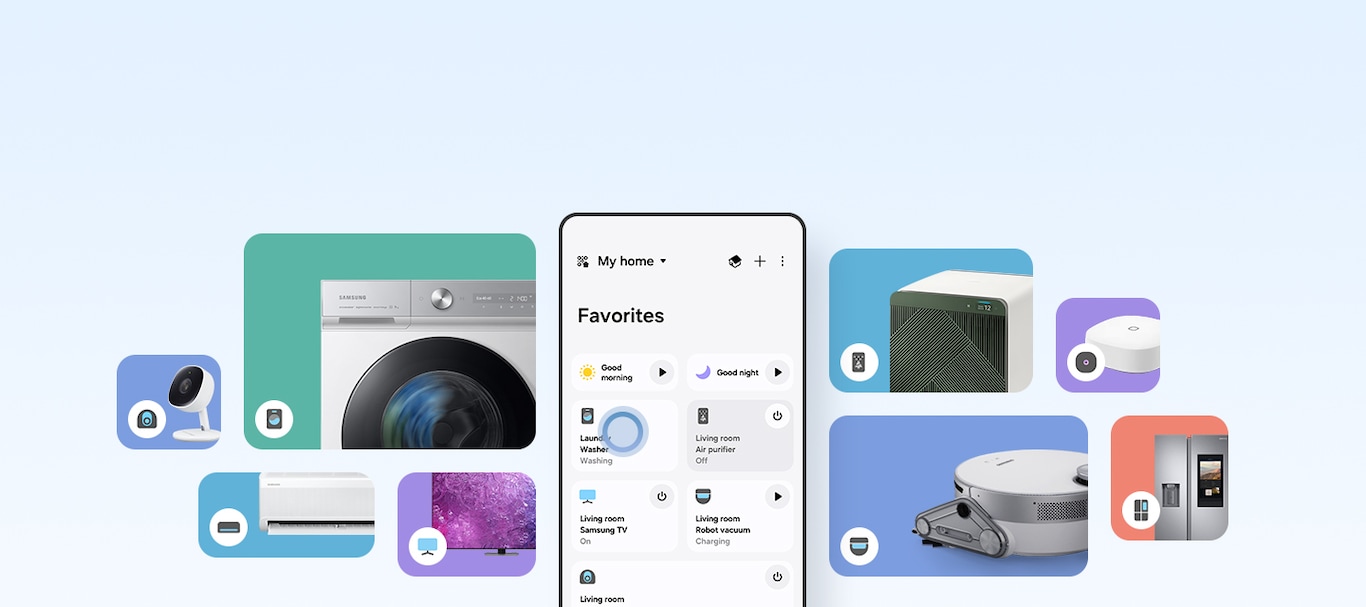
- Seamless Integration: Samsung apps not only work well with their appliances, but they also connect smoothly with other smart home devices.
In my experience, transitioning from other brands’ apps to Samsung’s was a game-changer. The simplicity of setting up customized meal plans and grocery lists with a few clicks streamlined my kitchen routine like never before.
While many brands offer tech-savvy features, none have matched the ease of use provided by Samsung apps, making them a clear frontrunner!
Common Troubleshooting Issues and Solutions for Samsung Mobile Apps
Connectivity Problems
While Samsung mobile apps are designed for seamless operation, users may occasionally encounter connectivity problems that disrupt their experience. This can be frustrating, especially when trying to access recipes or manage groceries from your refrigerator’s app.
Luckily, there are some straightforward solutions to these issues.
Common Connectivity Issues and Solutions:
- Wi-Fi Connection: Ensure that your refrigerator and smartphone are connected to the same Wi-Fi network. Check both devices to confirm the connection.
- App Updates: Regularly update your Samsung apps. Outdated versions can lead to connectivity issues, so keeping everything current is vital.
- Router Reset: Sometimes, simply rebooting your router can resolve network inconsistencies affecting connectivity.
In my own experience, I once faced a sudden disconnection while trying to set up a family meal plan. After checking the Wi-Fi connection and restarting the app, everything fell back into place!
Keeping these troubleshooting tips in mind can help you quickly get back to enjoying the full features of your Samsung mobile apps with minimal hassle.

User Reviews and Feedback on Samsung Mobile Apps
Positives and Negatives
User reviews play a crucial role in assessing the effectiveness of Samsung mobile apps for refrigerators. Drawing from various experiences, many users have shared both positive and negative feedback that highlights the overall functionality of these apps.
Positives:
- Intuitive Design: Many users praise the user-friendly interface, making it easy for anyone, regardless of tech-savviness, to navigate.
- Convenient Meal Planning: Users love the ability to access recipes and manage grocery lists effortlessly, significantly reducing the stress of daily meal prep.
- Seamless Integration: Feedback often highlights how well the apps connect with other Samsung smart devices, creating a cohesive smart home experience.
Negatives:
- Occasional Connectivity Issues: Some users express frustration with intermittent connectivity problems, especially in larger homes where Wi-Fi signals may vary.
- Limited Customization: While many enjoy the app’s features, a few users wish for more personalized options to tailor meal suggestions to specific dietary needs.
Having explored both sides of the feedback, it’s clear that while there are minor bumps on the road, the overall experience with Samsung mobile apps is typically positive.
Personally, I’ve found the apps to be invaluable in streamlining my kitchen tasks, with occasional hiccups easily resolved. Understanding these reviews can help potential users make informed decisions and prepare for a rewarding experience with Samsung’s innovations!

Hi, I’m the lead researcher and appliance enthusiast behind RefrigeratorSolve. With years of hands-on experience troubleshooting cooling systems and testing home appliances, I am dedicated to bringing you honest reviews, energy-saving tips, and practical solutions to keep your refrigerator running perfectly.