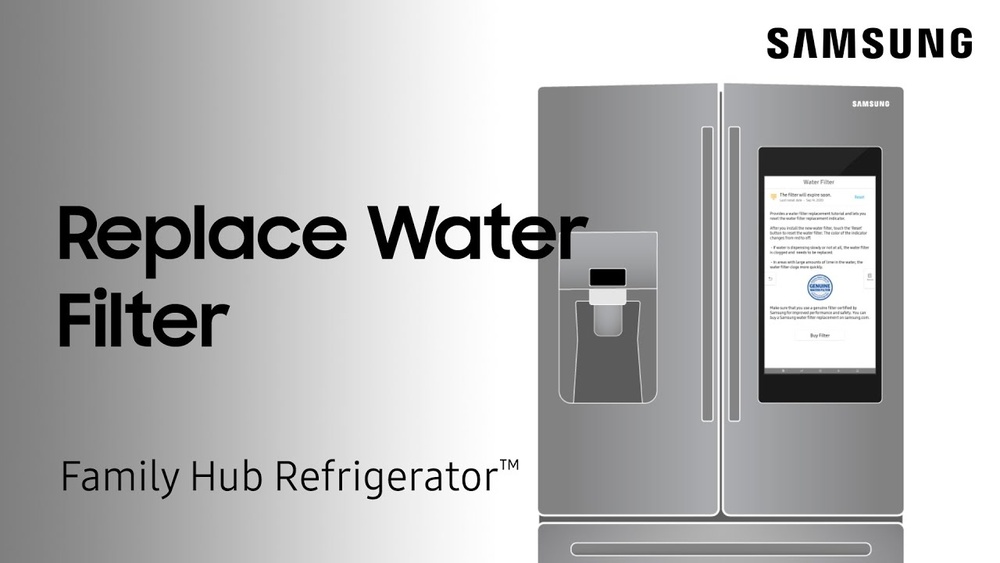
Is your Samsung Smart Refrigerator’s water filter light still glowing after you’ve changed the filter? It’s a common issue that can be confusing and frustrating.
But don’t worry—you’re just a few simple steps away from resetting that filter light and getting your fridge back to perfect working order. In this guide, you’ll learn exactly how to reset the water filter on your Samsung Smart Refrigerator quickly and easily.
Follow along, and you’ll save time, avoid unnecessary service calls, and keep your water clean and fresh. Ready to take control of your fridge’s maintenance? Let’s dive in!
Credit: www.samsung.com
Filter Replacement Basics
Replacing the water filter in your Samsung smart refrigerator keeps water clean and tasting fresh. Understanding the basics of filter replacement helps maintain your fridge’s performance. Regular filter changes prevent clogging and protect the internal water system.
Knowing when to replace the filter and choosing the right one ensures your fridge works well. This section explains the key points about filter replacement.
When To Replace The Filter
Most Samsung refrigerators show a filter indicator light. It turns on after about six months of use. This signals the need for a new filter. You may also notice slower water flow or a change in taste. These signs mean it’s time to replace the filter.
Waiting too long can cause bad water quality and damage your fridge. Change the filter promptly for the best results.
Choosing The Right Filter
Use filters designed specifically for your Samsung model. Check the user manual or the fridge label for the correct filter number. Genuine Samsung filters ensure proper fit and filtration.
Non-compatible filters may cause leaks or fail to remove contaminants. Always buy from trusted sellers to avoid fake products. Using the right filter keeps your water safe and your refrigerator running smoothly.
Locating The Water Filter
Knowing where your Samsung smart refrigerator’s water filter is located helps to reset it quickly. The filter can be in different spots depending on your fridge model. Two common places are inside the refrigerator or under the bottom grille. Finding the filter first makes the reset process easier.
Inside The Refrigerator
Many Samsung refrigerators have the water filter inside the fridge compartment. It usually sits in the upper right corner or near the top. Open the fridge door and look at the back or side walls. The filter is a small, cylindrical part that twists out. Some models have a cover that you need to open first.
Under The Bottom Grille
Some Samsung models place the water filter under the bottom grille. The grille is at the front base of the fridge. You can remove it by pulling it gently or using a small tool. The filter will be inside a housing behind the grille. This position makes it easy to access without opening the fridge door.
Removing The Old Filter
Removing the old water filter is the first step in maintaining your Samsung smart refrigerator. This task ensures clean water and fresh ice from your fridge. Handle the filter carefully to avoid damage or leaks.
Follow simple steps to remove the filter safely and prepare for the new one.
Releasing The Filter
Locate the filter inside the fridge, usually in the top right corner. Turn the filter counterclockwise. You will feel it loosen. Pull the filter straight out gently. Do not force it to avoid damage.
If the filter is tight, try pressing the release button while turning. Keep your hand firm but gentle.
Handling Precautions
Hold the filter upright to prevent water spills. Dispose of the old filter properly. Avoid touching the filter’s connection points. This prevents contamination and ensures a good seal with the new filter.
Wash your hands before and after handling the filter. Keep the area dry to avoid slipping or electric issues.
Installing The New Filter
Installing the new water filter in your Samsung smart refrigerator is simple. It ensures clean, fresh water and ice. Follow these clear steps to install the new filter correctly. Proper installation helps the refrigerator work well and keeps water pure.
Aligning And Inserting
First, remove the new filter from its packaging. Check for any protective caps and remove them. Hold the filter so the arrow or notch points the right way. Align the filter with the filter slot inside the fridge. Gently push the filter straight into the slot. Do not force it. It should slide in smoothly until it stops.
Securing The Filter
Once inserted, turn the filter clockwise about a quarter turn. This locks the filter in place. You will feel it click or stop turning. Make sure it is tight and secure. A loose filter can cause leaks or error lights. After securing, close the filter cover or door if your fridge has one. The filter is now ready for use.
Resetting The Filter Light
The filter light on a Samsung smart refrigerator alerts you when the water filter needs replacement. Resetting this light after changing the filter keeps your fridge running smoothly. It also ensures you receive clean, fresh water and ice. This process is simple and can be done in a few easy steps.
Using The Control Panel
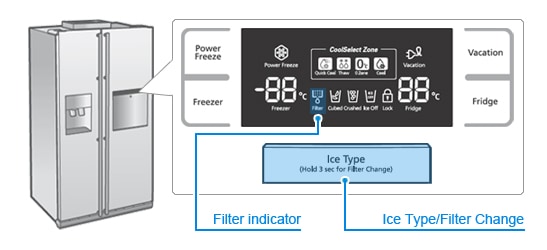
Locate the control panel on the front of your refrigerator door. Find the button labeled “Filter Reset” or “Water Filter.” Press and hold this button for about 3 seconds. The filter light should blink or turn off, confirming the reset. If the light stays on, try the steps again carefully. This method works on most Samsung smart refrigerator models.
Button Combinations To Try
Some Samsung models require pressing multiple buttons to reset the filter light. Try pressing and holding the “Alarm” and “Filter Reset” buttons at the same time for 3 seconds. Another option is to press and hold “Energy Saver” and “Filter Reset” simultaneously. Release the buttons once the filter light goes off. Check your user manual for specific button combinations for your model. These combinations help reset the light when a single button does not work.
Credit: www.samsung.com
Troubleshooting Common Issues
Troubleshooting common issues helps keep your Samsung smart refrigerator working well. Problems with the water filter can stop it from resetting properly. Some issues may cause the filter light to stay on or affect water taste and flow. Simple fixes often solve these problems fast. Check these tips to get your fridge back in shape.
Filter Light Won’t Reset
The filter light may stay on after replacement. This usually means the reset step was missed. Hold the reset button for about three seconds. Make sure the fridge door is closed while resetting. If the light still stays on, try unplugging the fridge for a minute. Plug it back in and press reset again.
Water Taste Or Flow Problems
Bad taste or slow water flow often means the filter needs changing. A clogged filter blocks water. Replace the filter with a new Samsung-approved one. Run water through the dispenser for a few minutes after installation. This clears air and loose carbon particles from the filter. Clean the water dispenser area to avoid buildup.
Filter Not Fully Installed
A filter not fully installed will cause errors. Remove the filter and check for debris inside the slot. Align the filter properly and push it firmly until it clicks. A loose filter can cause leaks and prevent the light from resetting. Always use filters designed for your Samsung model to avoid fitting issues.
Maintenance Tips
Proper maintenance helps your Samsung Smart Refrigerator work well. It keeps water clean and fresh. Simple care steps extend filter life and improve fridge performance.
Follow these tips to keep the water filter in top shape. They make resetting easier and prevent issues.
Regular Filter Changes
Change the water filter every six months. Old filters reduce water quality and flow. Mark the replacement date on your calendar. Use only Samsung-approved filters. This avoids damage and keeps your fridge safe.
Cleaning The Filter Area
Clean the filter area regularly to avoid dirt buildup. Turn off the water supply before cleaning. Wipe the filter slot with a soft, damp cloth. Remove dust and debris gently. Keep the area dry before inserting a new filter. This prevents leaks and helps the filter fit well.

Credit: www.youtube.com
Smart Features And Notifications
Samsung smart refrigerators offer advanced features to keep your water fresh and clean. The smart features help you track the filter’s condition easily. Notifications alert you when it is time to change or reset the water filter. These features save time and ensure better water quality.
Filter Status Alerts
Your Samsung smart fridge shows filter status alerts on its display panel. The alerts appear as colored lights or messages. A green light means the filter is good. A yellow or red light means the filter needs changing soon or now. These alerts help you avoid drinking unfiltered water. You will know exactly when to replace the filter without guessing.
Using The Samsung App
The Samsung app connects to your smart refrigerator for remote monitoring. It sends notifications about the filter’s status directly to your phone. You get alerts about filter life and replacement reminders. The app also guides you through the reset process after changing the filter. This smart connection makes maintenance easy and convenient. You can stay updated even if you are not at home.
Frequently Asked Questions
How To Reset Water Filter On Smart Samsung Fridge?
Press and hold the Ice Type and Child Lock buttons simultaneously for 3 seconds. The water filter light will reset.
How Do I Reset My Refrigerator After Changing The Water Filter?
Press and hold the water filter reset button for 3 seconds. The filter light will turn off, confirming the reset.
Why Is My Samsung Filter Light Still On After Reset?
The filter light stays on if the filter isn’t fully seated or if a non-Samsung filter is used. Reinstall the filter properly.
How Do I Reset My Samsung French Door Refrigerator?
Press and hold the Ice Type and Energy Saver buttons simultaneously for 3 seconds. The water filter light will reset.
Conclusion
Resetting the water filter on your Samsung smart refrigerator is simple. Just follow the steps carefully and press the reset button. Doing this keeps your water clean and tasting fresh. Remember to replace the filter regularly for best results. A properly reset filter light helps you track filter life easily.
Keep your fridge running smoothly with this quick maintenance. Now, enjoy fresh water and peace of mind every day.

Hi, I’m the lead researcher and appliance enthusiast behind RefrigeratorSolve. With years of hands-on experience troubleshooting cooling systems and testing home appliances, I am dedicated to bringing you honest reviews, energy-saving tips, and practical solutions to keep your refrigerator running perfectly.