If you own an LG Smart Diagnosis Refrigerator, you might wonder how to get the most out of its smart features. Imagine being able to quickly identify and solve fridge issues without waiting for a technician.
You can do this easily using the LG Smart Diagnosis feature. It helps you troubleshoot problems right from your smartphone, saving you time and frustration. In this guide, you’ll learn exactly how to use LG Smart Diagnosis to keep your refrigerator running smoothly and avoid common headaches.
Keep reading to unlock simple steps that put control of your fridge’s health in your hands!
Activate Smart Diagnosis
Activating Smart Diagnosis on your LG Smart Refrigerator helps detect issues quickly. This feature lets your fridge communicate with the LG support team using your smartphone. Follow these simple steps to start using Smart Diagnosis and keep your refrigerator running smoothly.
Download Lg Thinq App
First, download the LG ThinQ app from the App Store or Google Play. This app is free and easy to install. It connects your phone with your LG refrigerator for remote control and diagnosis.
Set Up Your Refrigerator In App
Open the LG ThinQ app and create an account or log in. Add your refrigerator by selecting “Add Device” and follow the prompts. Make sure your fridge is connected to Wi-Fi to complete the setup. This step links your appliance to the app for smart features.
Locate Smart Diagnosis Feature
Inside the app, find the Smart Diagnosis option in the device menu. Tap on it to activate the feature. Your fridge will then communicate its status to the app, helping diagnose any problems quickly. This saves time and avoids unnecessary service calls.

Credit: www.youtube.com
Performing Smart Diagnosis
Performing Smart Diagnosis on your LG Smart Refrigerator helps identify issues quickly. This feature sends data to LG support or your app for fast troubleshooting. Use simple steps from your phone or the fridge itself to run the diagnosis. The process saves time and may prevent costly repairs.
Initiate Diagnosis From App
Open the LG ThinQ app on your smartphone. Select your refrigerator from the list of devices. Tap the “Smart Diagnosis” option on the menu. Follow the on-screen instructions to start the diagnosis. The app will communicate with the fridge and analyze its status. Wait for the results, which show any detected problems.
Using Refrigerator’s Speaker Method
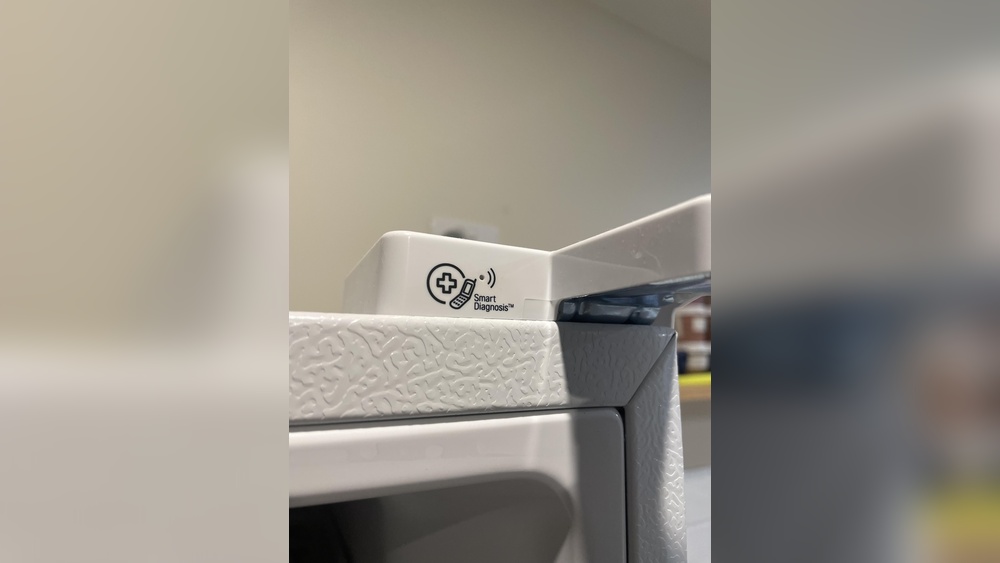
Press and hold the Smart Diagnosis button on your refrigerator. The fridge will emit a series of beeps and sounds. These sounds carry information about the appliance’s condition. Call LG Customer Service and hold your phone near the fridge speaker. The technician will listen and interpret the data. This method works without using a smartphone app.
Using Phone Microphone Method
Open the LG ThinQ app and select Smart Diagnosis. Hold your phone’s microphone close to the refrigerator’s speaker. Press the Smart Diagnosis button on the fridge. The fridge will send sound signals to your phone. The app analyzes these signals to find any issues. Follow the app’s advice based on the diagnosis results.
Interpreting Results
Interpreting the results from your LG Smart Diagnosis refrigerator is key to quick and accurate troubleshooting. The system provides clear data to help you understand your fridge’s condition. This section explains how to read error codes, understand status messages, and decide on the next steps. Clear interpretation saves time and avoids unnecessary repairs.
Reading Error Codes
Error codes show specific problems inside your refrigerator. Each code matches an issue like cooling failure or sensor faults. The ThinkQ app or your user manual lists these codes and their meanings. Pay attention to the exact code displayed. This helps identify the root cause quickly. Write down any codes before seeking support.
Understanding Status Messages
Status messages tell you about the fridge’s current state. They report normal functions or warnings. Messages may indicate temperature settings, door open alerts, or filter changes. The app shows these clearly, using simple language. Knowing these messages helps keep your fridge working well. Respond to alerts promptly to avoid bigger issues.
Next Steps Based On Results
After reading codes and messages, decide your next move. Some problems you can fix yourself, like resetting the fridge or cleaning filters. Other issues require professional help, such as compressor or refrigerant faults. Use the app’s suggestions to guide you. Contact LG support if the problem persists or is unclear. Acting fast keeps your food safe and your fridge efficient.

Credit: www.youtube.com
Troubleshooting Common Issues
Troubleshooting common issues with your LG Smart Diagnosis refrigerator can save time and effort. This feature helps identify problems quickly and guides you through simple fixes. Understanding typical problems is key to keeping your fridge running smoothly. Below are frequent issues and how to address them using Smart Diagnosis.
Cooling Problems
Cooling problems often occur due to compressor or sensor issues. Use the Smart Diagnosis feature to detect if the compressor is working properly. The app listens to the sounds and analyzes data from the fridge. If cooling is weak, check if vents are blocked or if the door seals are tight. Clean condenser coils to improve cooling efficiency. Smart Diagnosis can help pinpoint exact causes fast.
Water Leakage
Water leakage may result from clogged or frozen defrost drains. Smart Diagnosis can help find leaks and suggest solutions. Check if the drain hole is blocked by debris or ice. Clear any blockages gently to allow water to flow freely. Also, inspect the water filter and dispenser connections for tight seals. This prevents water from leaking inside or outside the fridge.
Unusual Noises
Strange noises like buzzing or clicking can indicate compressor or fan problems. Use Smart Diagnosis to identify noisy components. Sometimes debris inside the fan or motor causes sounds. Make sure the fridge is level and not touching walls. Tighten loose parts to reduce noise. Smart Diagnosis guides you to address noises before they cause damage.
Tips For Optimal Use
Using your LG Smart Diagnosis Refrigerator properly can extend its life and keep it running smoothly. Simple habits help avoid common problems and improve performance. Follow these tips for the best experience with your smart fridge.
Maintaining Proper Ventilation
Keep enough space around the refrigerator for air to circulate. Avoid placing the fridge too close to walls or cabinets. Proper ventilation stops overheating and helps the compressor work well. Check the vents regularly to remove dust and blockages.
Regular Cleaning
Clean both inside and outside of your fridge often. Wipe spills immediately to prevent odors and mold. Remove and wash shelves and drawers with mild soap and water. Clean the door seals gently to keep them tight and stop cold air from escaping.
Updating Firmware Via App
Use the LG ThinQ app to check for firmware updates. Updates improve fridge functions and fix bugs. Connect your phone to the fridge, then follow the app instructions to install updates. Regular updates keep your smart features working properly.
When To Contact Support
Knowing when to contact support for your LG Smart Diagnosis refrigerator is important. Some issues need professional help to avoid damage. Recognizing these moments saves time and prevents bigger problems. Below are key points to guide you on when to reach out to support.
Identifying Serious Problems
Serious problems include no cooling or strange noises. A warm fridge or freezer signals a major issue. Water leaks inside or outside can harm your floor. If lights do not turn on, it may be electrical. Strange odors or ice buildup also need expert checks. These signs mean you should contact LG support quickly.
Warranty And Repair Options
Check your warranty before calling for repairs. LG refrigerators usually come with a one-year warranty. Some parts may have longer coverage. Knowing your warranty helps avoid unexpected costs. Support can guide you on repair centers or technician visits. Use authorized service to keep your warranty valid.
Using Smart Diagnosis For Service Calls
LG Smart Diagnosis helps explain problems to support staff. Use the ThinQ app to start a diagnosis. Hold your phone near the fridge and follow app instructions. The app sends data to LG support for fast help. This tool reduces waiting time for repairs. It also helps technicians know the issue before arriving.

Credit: www.reddit.com
Frequently Asked Questions
How Do I Use The Smart Diagnostics On My Lg Refrigerator?
Open the LG ThinQ app on your phone. Tap the Smart Diagnosis option. Hold your phone’s microphone near the refrigerator’s Smart Diagnosis logo. Follow the app’s voice prompts to complete the diagnosis. This helps identify issues quickly without needing technician visits.
Is Lg Smart Diagnosis Free?
LG Smart Diagnosis is a free feature within the LG ThinQ app. It helps troubleshoot appliance issues quickly without extra cost.
What Is The Most Common Problem With Lg Refrigerators?
The most common problem with LG refrigerators is linear compressor failure. This causes poor cooling, strange noises, or complete cooling loss. Other issues include refrigerant leaks, faulty start relays, and water leaks. These problems often require professional repair and can occur before the expected lifespan.
What App Do I Use For Lg Smart Diagnosis?
Use the LG ThinQ app for Smart Diagnosis. Open the app, select your device, and tap Smart Diagnosis to start troubleshooting.
Conclusion
Using the LG Smart Diagnosis feature helps identify fridge issues quickly. Simply open the LG ThinQ app and select Smart Diagnosis. Follow the easy steps to send data to support. This tool saves time and avoids unnecessary repairs. It helps keep your refrigerator running smoothly.
Regular use can detect problems early before they get worse. Trust this simple method to maintain your LG fridge with less hassle.

Hi, I’m the lead researcher and appliance enthusiast behind RefrigeratorSolve. With years of hands-on experience troubleshooting cooling systems and testing home appliances, I am dedicated to bringing you honest reviews, energy-saving tips, and practical solutions to keep your refrigerator running perfectly.