Is your LG refrigerator acting up and leaving you puzzled? Before you rush to call a technician or worry about costly repairs, there’s a smarter way to understand what’s going on—right from your smartphone.
With LG’s Smart Diagnosis feature, you can quickly identify common issues like cooling problems, strange noises, or water leaks without any guesswork. This easy-to-use tool puts the power of troubleshooting directly in your hands, saving you time and stress. In this guide, you’ll learn exactly how to do a Smart Diagnosis on your LG refrigerator step-by-step, so you can get to the root of the problem fast and decide what to do next.
Stick with us, and you’ll never feel lost when your fridge needs a checkup again.

Credit: www.youtube.com
Smart Diagnosis Features
LG refrigerators come with Smart Diagnosis features that simplify troubleshooting. These features help identify problems quickly. They save time and reduce repair costs. Understanding these features makes handling fridge issues easier. You get clear guidance without technical jargon.
How Smart Diagnosis Works
Smart Diagnosis listens to sounds from your refrigerator. It detects unusual noises and operation patterns. These clues help identify specific faults. The system analyzes data through the fridge’s control panel. It then provides error codes or suggestions. This process is fast and accurate. It reduces the need for technician visits.
Using The Lg Smart Diagnosis App
The LG Smart Diagnosis app connects your smartphone to the fridge. It guides you step-by-step through the diagnosis process. You start by placing your phone near the appliance. The app records sounds and sends data to LG support. You receive instant feedback and possible fixes. It also logs your fridge’s health over time. The app is easy to use for all ages.
Free Benefits Of Smart Diagnosis
Smart Diagnosis is a free service included with your LG refrigerator. It saves money by reducing unnecessary repairs. You get quick solutions without waiting for a technician. The system helps extend your fridge’s lifespan. It also improves safety by detecting issues early. Using this feature keeps your appliance running smoothly. No extra fees, just reliable help anytime.

Credit: www.youtube.com
Common Lg Refrigerator Issues
LG refrigerators are reliable but can face some common issues over time. Knowing these problems helps in early detection. Early diagnosis can save money and extend your fridge’s life.
Below are typical issues LG refrigerator owners often face. Each problem affects fridge performance and efficiency differently.
Signs Of Compressor Failure
The compressor is the heart of the refrigerator. When it fails, cooling stops or weakens. You might hear clicking, buzzing, or humming noises. The fridge may feel warm or not cold enough. The freezer could also lose its frost. These signs indicate the compressor needs attention.
Detecting Refrigerant Leaks
Refrigerant leaks reduce cooling power. You might notice the fridge runs longer than usual. Ice may build up inside the freezer or fridge sections. A sudden rise in temperature inside is another clue. These leaks often come from small cracks in coils. Professional repair is necessary for refrigerant leaks.
Start Relay Problems
The start relay helps the compressor begin working. If it fails, the compressor may not start at all. You could hear clicking sounds repeatedly. The fridge may stop cooling suddenly. Checking the start relay is important when the fridge won’t cool properly.
Water Leakage Causes
Water leaking inside or under the fridge is a common issue. Blocked defrost drains often cause this. Cracked or damaged water supply lines may also leak. Check if water pools near the door or inside drawers. Cleaning the drain or fixing leaks can stop water problems.
Troubleshooting Steps
Troubleshooting your LG refrigerator using Smart Diagnosis helps identify problems fast. Follow clear steps to spot issues early and avoid bigger repairs. Start with simple checks before using the Smart Diagnosis feature. Know when professional help is needed to keep your fridge working well.
Performing Basic Checks
Check if the refrigerator is plugged in properly. Ensure the power outlet works by testing another device. Look for any visible damage or loose parts inside the fridge. Check the temperature settings to confirm they are correct. Clean the condenser coils if they are dusty. Make sure the door seals close tightly without gaps. These steps fix many common issues without extra tools.
Using Smart Diagnosis For Errors
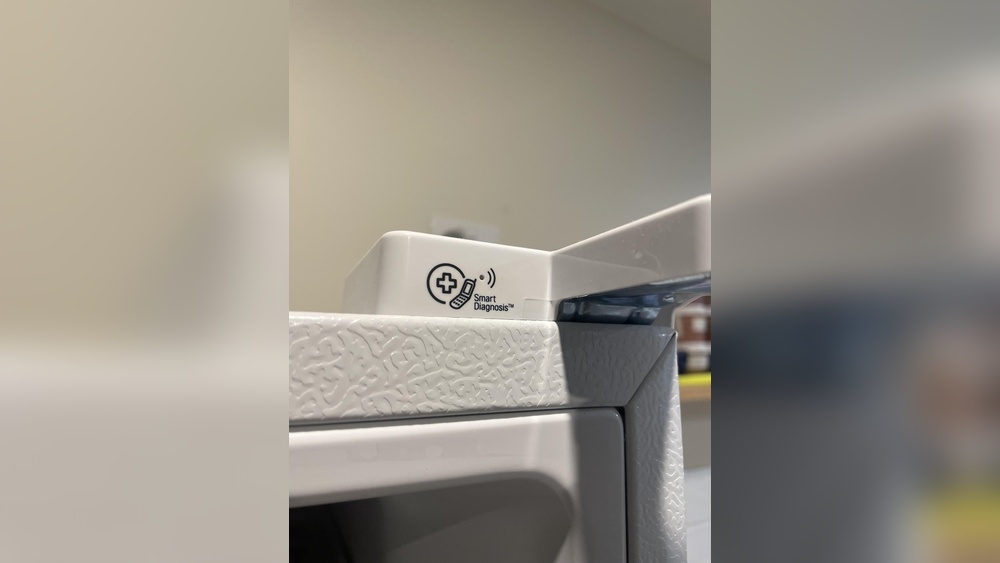
LG’s Smart Diagnosis feature helps find hidden errors quickly. Open the LG Smart Diagnosis app on your phone. Hold the phone’s microphone near the fridge’s Smart Diagnosis logo. Follow the app instructions to start the sound-based test. The fridge sends error codes via sound signals. The app analyzes these codes and shows possible problems. This method saves time and guides you on what to fix next.
When To Call A Technician
Call a technician if basic checks and Smart Diagnosis show no fix. Issues like strange noises, no cooling, or leaks need expert care. Avoid opening sealed parts or handling refrigerant yourself. A technician has tools and skills to repair complex problems safely. Regular service can extend the life of your refrigerator. Professional help ensures your fridge runs smoothly and efficiently.
Compressor Problems Explained
The compressor is the heart of your LG refrigerator. It moves refrigerant through the system to keep your food cold. Understanding compressor problems helps you spot issues early. This saves time and money on repairs.
Why Linear Compressors Fail
Linear compressors in LG refrigerators use fewer moving parts. This design improves efficiency but can still fail. Common causes include overheating, electrical faults, and mechanical wear. Dirt or dust buildup around the compressor can also cause it to work harder and fail sooner.
Continuous running without proper cooling can damage the compressor motor. Power surges may cause electrical damage. Age and heavy use also reduce compressor life.
Symptoms Of Compressor Issues
Signs of compressor problems are easy to notice. The refrigerator may stop cooling properly or become warm inside. Strange noises like clicking, buzzing, or humming can occur near the compressor area. The freezer might stay warm while the fridge is slightly cool.
Sometimes the compressor runs constantly or not at all. Ice buildup in the freezer or water leaking underneath could also indicate compressor trouble.
Impact On Cooling Performance
A faulty compressor lowers the refrigerator’s cooling power. This can cause food to spoil faster. The fridge may struggle to keep a steady temperature. Fluctuating temperatures harm fresh produce and frozen items.
Without a working compressor, the cooling cycle stops. The fridge will not maintain cold air inside. This makes the appliance unreliable and may increase energy use.
Maintenance Tips
Proper maintenance keeps your LG refrigerator running smoothly. Small efforts prevent big problems. Follow these simple tips to care for your fridge. These steps also help you use the Smart Diagnosis feature effectively. Regular upkeep ensures your appliance works well for years.
Cleaning Air Vents And Coils
Dust and dirt block air vents and coils. This reduces cooling efficiency. Turn off the fridge and unplug it first. Use a vacuum or soft brush to clean the coils gently. Clear dust from air vents to improve airflow. Clean these areas every three to six months.
Preventing Water Leaks
Water leaks can cause damage and reduce fridge performance. Check the water filter and dispenser regularly. Replace the water filter as recommended by LG. Inspect door seals for cracks or gaps. Clean the drain hole and drip pan to avoid clogs. Keep the fridge level to prevent leaks.
Extending Refrigerator Lifespan
Keep the fridge temperature stable between 37°F and 40°F. Avoid overloading the fridge to allow proper air circulation. Close doors tightly after use to save energy. Schedule periodic checks for wear and tear. Use Smart Diagnosis for quick troubleshooting and timely fixes.
Warranty And Repair Options
Understanding your LG refrigerator’s warranty and repair options can save time and money. It helps to know how to check warranty status, stay updated on legal matters, and find authorized repair services. This knowledge supports smart diagnosis and proper maintenance.
Checking Warranty Status
Start by locating your refrigerator’s model and serial number. Visit the official LG website or use their customer service to verify warranty details. Warranties usually cover parts and labor for a specific time. Knowing your warranty status prevents unexpected repair costs.
Class Action Lawsuit Updates
Some LG refrigerators face issues like compressor failures. Class action lawsuits may affect repair options and compensation. Regularly check trusted news sources or legal websites for updates. Awareness of these cases helps you understand your rights and possible remedies.
Authorized Repair Services
Always choose authorized LG repair centers for service. These centers use genuine parts and follow LG’s repair standards. Using authorized services ensures your warranty remains valid. It also guarantees quality repairs and better appliance performance.

Credit: www.reddit.com
Frequently Asked Questions
Is Lg Smart Diagnosis Free?
LG Smart Diagnosis is a free feature in the app that helps troubleshoot washer problems quickly and easily.
What Is The Number For Lg Smart Diagnosis?
The LG Smart Diagnosis number is 1-800-243-0000. Call this for quick appliance troubleshooting support.
What Is The Most Common Problem With Lg Refrigerators?
The most common LG refrigerator problem is linear compressor failure, causing poor cooling, strange noises, or complete cooling loss.
How To Put Lg Fridge Into Test Mode?
To enter LG fridge test mode, press and hold the Freezer and Fridge buttons simultaneously for 5 seconds. The display will show a code indicating test mode activation. Use this mode to diagnose and check the refrigerator’s functions quickly. Exit by pressing any button.
Conclusion
Smart Diagnosis helps find LG fridge problems quickly and easily. Follow simple steps to use the feature at home. It saves time and avoids unnecessary repair calls. Understanding error codes guides you to fix issues faster. Keep your refrigerator running smoothly and prevent bigger problems.
Using Smart Diagnosis brings peace of mind and convenience. Try it whenever your LG fridge shows unusual behavior. Stay proactive and enjoy a well-functioning appliance every day.

Hi, I’m the lead researcher and appliance enthusiast behind RefrigeratorSolve. With years of hands-on experience troubleshooting cooling systems and testing home appliances, I am dedicated to bringing you honest reviews, energy-saving tips, and practical solutions to keep your refrigerator running perfectly.