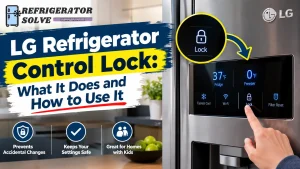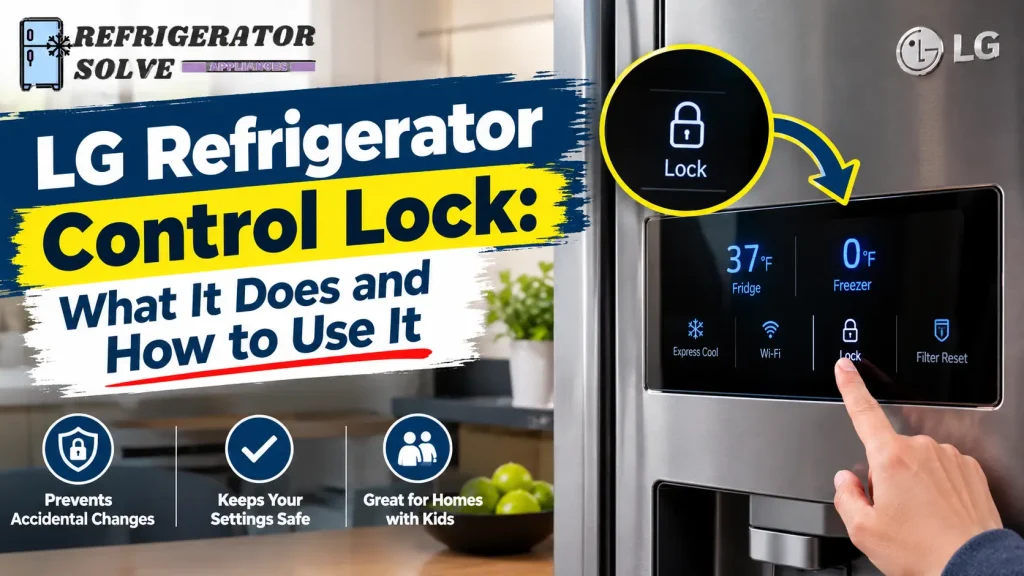
Have you ever tried to change the temperature on your LG refrigerator, only to find that none of the buttons respond? Or perhaps you noticed a small padlock symbol on the display and wondered what it means. In many cases, the LG refrigerator control lock function is responsible.
The Control Lock feature prevents accidental changes to refrigerator settings by disabling certain buttons on the control panel. Depending on your LG model, it may also stop the water and ice dispenser from operating. Understanding how this feature works can help you avoid unnecessary resets and service calls.
Quick Answer: The LG refrigerator control lock function prevents accidental button presses and changes to refrigerator settings. On many compatible models, you can turn it on or off by pressing and holding the Lock button for approximately 3 seconds. However, the exact procedure and button location depend on your refrigerator model.
What Is the Control Lock Function on an LG Refrigerator?
The Control Lock function is a built-in feature designed to prevent unwanted operation of your refrigerator’s control panel.
For example, imagine someone accidentally touches the temperature buttons while cleaning the refrigerator door. The temperature setting could change without you noticing. The Control Lock feature helps prevent this from happening.
It is also useful for households with children who may touch the display or press buttons while playing near the refrigerator.
When Control Lock is activated, the refrigerator ignores certain button presses until you unlock the panel.
Depending on the model, you may notice:
- A padlock or Lock symbol on the display.
- Temperature buttons that no longer respond.
- A beep when you press a locked button.
- Water or ice dispensing that stops working.
- A message indicating that the controls are locked.
The feature does not normally turn off the refrigerator’s cooling system. It simply restricts access to the controls.
According to LG’s official refrigerator control panel guidance, an active Lock function can make the control panel appear unresponsive.
What Does LG Refrigerator Control Lock Actually Do?
The main purpose of Control Lock is to protect your refrigerator settings from accidental changes. However, its exact behavior depends on the control panel design.
Here are the main functions.
1. Prevents Accidental Temperature Changes
When the control panel is locked, you generally cannot change the refrigerator or freezer temperature using the affected buttons.
This helps maintain your existing temperature settings when someone accidentally touches the display.
To adjust the temperature again, you may need to unlock the panel first.
2. Disables Selected Control Panel Buttons
An active Control Lock can prevent certain buttons from responding.
For instance, pressing the Refrigerator or Freezer temperature button may produce a beep without changing the setting.
Some LG models disable all control panel buttons except the Lock button. Others have a different arrangement.
3. Helps Prevent Unwanted Touch Inputs
Control Lock is particularly useful when cleaning the exterior display.
Without this feature, touching the control panel accidentally could activate a setting or change the refrigerator temperature.
4. May Disable the Water and Ice Dispenser
This depends on your refrigerator model.
On some LG refrigerators, activating Control Lock disables both the control panel and the water and ice dispenser.
Other models may have separate dispenser-lock controls.
Therefore, a dispenser that stops working while the panel is locked does not necessarily indicate a water supply problem.
How to Tell If Your LG Refrigerator Control Lock Is On
You do not need any special equipment to check whether Control Lock is active.
Start by examining the display and trying to use the controls.
Look for these signs:
A padlock symbol appears: A locked padlock icon is one of the clearest indications that Control Lock may be enabled.
Buttons do not respond: Try pressing the refrigerator temperature button. If the display does not accept the input, the panel may be locked.
The refrigerator beeps: Some LG models produce an audible sound when someone presses a disabled button.
The water or ice dispenser stops working: If your model disables the dispenser during Control Lock, dispensing may stop until you unlock the controls.
The lock indicator flashes: On some models, the lock indicator may flash when you attempt to use a disabled button.
Do not assume that every flashing indicator means the same thing. Check your owner’s manual for the meaning of the display pattern on your particular refrigerator.
Where Is the Control Lock Button on an LG Refrigerator?
The Lock button does not have one universal location across all LG refrigerators.
Depending on the design, you may find it on the external dispenser panel, inside the refrigerator compartment, or integrated into a touchscreen display.
Here are a few places worth checking.
Control Lock on French Door Models
On many French door refrigerators, the control panel is located on the front of one of the doors or just inside the refrigerator compartment.
Look for a button labeled Lock, Lock/Unlock, or a padlock symbol.
Some models place the temperature controls and lock function together on the interior control panel.
Control Lock on Side-by-Side Models
Side-by-side refrigerators often have their control buttons on the freezer door or dispenser panel.
Look around the temperature controls and dispenser settings for the Lock button.
Control Lock on Top-Freezer Models
Some LG top-freezer refrigerators have a simpler control panel with fewer buttons.
The Lock/Unlock button may be positioned near the bottom of the panel.
LG’s official guide to unresponsive control panel buttons includes examples of different panel layouts.
What If Your LG Refrigerator Has No Lock Button?
Some LG refrigerator models do not have a dedicated Lock or Lock/Unlock button.
Do not try random button combinations because you could accidentally activate another feature.
Instead, locate your refrigerator’s complete model number and download its owner’s manual from LG Product Support.
The manual will help you identify the correct controls and determine whether your refrigerator has a locking function.
How to Turn On the Control Lock Function on an LG Refrigerator
Once you know where the Lock button is located, activating the feature is generally straightforward.
On compatible models, follow these steps:
- Make sure the refrigerator is operating normally.
- Locate the Lock or Lock/Unlock button on the control panel.
- Press and hold the button for approximately 3 seconds, if specified in your manual.
- Listen for a confirmation beep.
- Check the display for a locked padlock icon or another confirmation.
Once the Lock function is active, try pressing a temperature button. The control panel should prevent the corresponding setting from changing.
Important: The 3-second method applies to many LG refrigerators, but not every model uses identical controls. Follow your owner’s manual if the button layout or procedure is different.
How to Turn Off or Unlock the LG Refrigerator Control Lock
If your LG refrigerator buttons are not responding because Control Lock is enabled, you can usually restore normal operation by unlocking the panel.
Try these steps:
Step 1: Locate the Lock Button
Find the Lock or Lock/Unlock button on the refrigerator’s control panel.
Step 2: Press and Hold the Button
On many compatible models, press and hold the button for approximately 3 seconds.
Do not release it immediately after pressing. The refrigerator may need the full holding period to recognize your command.
Step 3: Listen for a Confirmation Beep
Some LG models produce a beep when the locking function changes.
Step 4: Check the Lock Indicator
Look at the display. The locked padlock icon should disappear or change to indicate that the controls are unlocked.
Step 5: Test the Control Panel
Press the Refrigerator or Freezer temperature button to check whether the display responds.
If the buttons work again, the Control Lock has been successfully deactivated.
LG also explains this procedure in its official refrigerator temperature adjustment guide.
If the panel does not unlock, do not keep pressing random buttons. Follow the troubleshooting steps below.
Does LG Refrigerator Control Lock Affect the Water and Ice Dispenser?
Yes, it can.
On some LG refrigerators, activating Control Lock prevents both the control panel and the dispenser from operating.
For example, you may notice that the temperature controls do not respond and the refrigerator stops dispensing water or ice.
However, other LG models have separate controls for the panel and dispenser.
Here is what you should understand.
Why the Water Dispenser May Stop Working
If your refrigerator uses a Control Lock setting that disables the dispenser, water will not come out while the feature is active.
First, check for a locked padlock icon.
If the panel is locked, follow the correct unlocking procedure and try dispensing water again.
If the dispenser still does not work, investigate the water supply, filter, and dispenser system separately.
Why the Ice Dispenser May Not Respond
The same issue can affect ice dispensing on compatible models.
If the ice dispenser stops working at the same time as the control panel, check the lock status before investigating the ice maker.
You can also consult LG’s official refrigerator dispenser troubleshooting guide.
Control Lock vs. Separate Dispenser Lock
These functions should not be confused.
| Feature | Main purpose |
|---|---|
| Control Lock | Prevents operation of selected control panel buttons |
| Dispenser Lock | Prevents water or ice dispensing |
| Child Lock | Helps prevent unintended operation by children |
Not every LG refrigerator has three separate features. Some models use one Lock function to control multiple operations.
Always check your owner’s manual before assuming that your refrigerator has separate locking settings.
LG Refrigerator Control Lock vs. Child Lock: Are They Different?
Many refrigerator owners use the terms Control Lock and Child Lock interchangeably.
Both relate to preventing accidental operation, particularly in households with children.
However, the names and available functions can differ between LG models.
Some models simply provide a Lock function that disables control panel buttons. Other appliances may use child-safety terminology for a similar purpose.
The important thing is not the name but how the function operates on your specific refrigerator.
Check your model’s manual to understand which buttons and dispenser functions are affected.
LG Refrigerator Control Lock Not Working? How to Fix It
Sometimes the Control Lock will not turn off even after you press the correct button.
Before assuming that the control board has failed, work through these checks.
1. You Are Pressing the Wrong Lock Button
Some LG refrigerators have several buttons that require a press-and-hold action.
For example, temperature controls, filter reset buttons, and other functions may also have special activation procedures.
Make sure you have identified the actual Lock button.
If you cannot find it, check your owner’s manual rather than experimenting with different combinations.
2. You Are Not Holding the Button Long Enough
One common mistake is pressing the Lock button for only a second.
Many compatible LG models require approximately 3 seconds to activate or deactivate the function.
Try the procedure again and hold the correct button for the full specified time.
If you do not hear a confirmation sound, release the button and try again, as advised in LG’s official control panel troubleshooting instructions.
3. Dirt or Moisture Is Affecting the Touch Controls
Refrigerator control panels can collect fingerprints, grease, and moisture during everyday use.
This buildup may interfere with touch-sensitive buttons.
To check:
- Take a clean, dry microfiber cloth.
- Gently wipe the control panel.
- Remove any visible moisture or residue.
- Allow the surface to dry completely.
- Try the unlocking procedure again.
Avoid spraying water or cleaning liquid directly onto the control panel.
4. The Lock Icon Will Not Disappear
If the lock icon remains visible after you press the button, the refrigerator may not have registered your command.
Check the following:
- Are you pressing the correct button?
- Does your model require a longer press?
- Is the control surface clean and dry?
- Does the owner’s manual describe another unlocking procedure?
If none of these checks helps, the control panel may have another problem.
5. The Control Panel Is Still Not Responding
If the panel remains unresponsive after confirming that it is unlocked, the issue may not be Control Lock.
Possible causes include:
- A temporary electrical or software issue.
- An interruption in the power supply.
- A faulty touch interface.
- A problem with the control board or related wiring.
LG recommends checking the power supply when the control panel remains unresponsive.
You can review LG’s official control panel troubleshooting guide for additional checks.
If you need broader guidance on touchscreen problems, see our guide to smart fridge touch screen problems.
6. When Should You Contact LG Customer Support?
Contact LG support or a qualified appliance technician if:
- The control panel remains unresponsive after the recommended checks.
- The display shows an error code.
- Buttons activate randomly.
- The display repeatedly freezes or goes blank.
- The refrigerator develops additional operating problems.
If your model supports Smart Diagnosis, you can also learn how LG Refrigerator Smart Diagnosis works.
Do not open the control panel or attempt electrical repairs unless you have the necessary qualifications.
Does LG Refrigerator Control Lock Turn On or Off Automatically?
Most LG refrigerator Control Lock functions are operated manually, but the behavior depends on the specific model.
On compatible models, you activate or deactivate the function using the Lock button.
Do not assume that every LG refrigerator automatically locks its control panel after a certain period of inactivity.
Some models have different display or power-saving behaviors that may make the panel appear inactive even when Control Lock is not enabled.
If the Lock icon appears unexpectedly or the panel behaves differently than usual, check the manual for your model.
Frequently Asked Questions
1. What Does Control Lock Mean on an LG Refrigerator?
Control Lock is a feature that prevents accidental operation of certain control panel buttons. Depending on the model, it may also disable the water and ice dispenser.
2. How Do I Unlock My LG Refrigerator Control Panel?
On many compatible LG refrigerators, press and hold the Lock or Lock/Unlock button for approximately 3 seconds. Check the display to confirm that the locked indicator has disappeared.
3. Why Is My LG Refrigerator Lock Icon Blinking?
A blinking lock icon may indicate that the refrigerator is responding to an attempted button press while the controls are locked. However, the exact meaning depends on the model and display behavior. Check your owner’s manual for confirmation.
4. Why Won’t My LG Refrigerator Unlock?
Possible reasons include pressing the wrong button, not holding it long enough, moisture on the touch controls, or a malfunctioning control panel. Start by checking the model-specific unlocking procedure.
5. Does LG Refrigerator Control Lock Stop Cooling?
No. The Control Lock function is designed to restrict operation of the control panel. It does not normally turn off the cooling system. If your refrigerator is getting warm, investigate the cooling problem separately.
6. Can I Use the Water Dispenser When Control Lock Is On?
It depends on the model. Some LG refrigerators disable the water and ice dispenser when Control Lock is active, while other models have separate dispenser controls.
7. Why Does My LG Refrigerator Have No Lock Button?
Some LG refrigerator models do not have a dedicated Lock button. Their control arrangements may be different. Check your model number and owner’s manual to identify the correct settings.
8. Is LG Control Lock the Same as Child Lock?
Not necessarily. Both functions are related to preventing accidental operation, but LG’s terminology and available controls vary by model. Refer to your refrigerator’s manual to identify the exact feature.
Final Thoughts
The LG refrigerator control lock function is useful for preventing accidental button presses and protecting your existing refrigerator settings. However, when it is activated unexpectedly, it can make the control panel appear broken.
Before considering a repair, check the lock indicator, locate the correct button, and follow the unlocking procedure recommended for your model. If the controls still do not respond, inspect the panel for moisture or dirt and check the power supply.
Most importantly, remember that LG refrigerators do not all use identical control panels. Your owner’s manual is the best source for model-specific instructions.
A few simple checks can help you identify the actual problem and avoid an unnecessary service call.

Hi, I’m the lead researcher and appliance enthusiast behind RefrigeratorSolve. With years of hands-on experience troubleshooting cooling systems and testing home appliances, I am dedicated to bringing you honest reviews, energy-saving tips, and practical solutions to keep your refrigerator running perfectly.