If you own an LG refrigerator, you might wonder how to quickly spot and fix issues before they turn into costly repairs. That’s where Smart Diagnosis comes in.
This clever feature lets you use your smartphone to check your fridge’s health instantly. Imagine saving time, avoiding technician visits, and getting your fridge back to perfect working order faster than ever. You’ll discover exactly what Smart Diagnosis is, how it works, and why it can be a game-changer for keeping your LG refrigerator running smoothly.
Keep reading to learn how this smart tool puts control right at your fingertips.

Credit: www.youtube.com
Smart Diagnosis Features
LG refrigerators come with a smart feature called Smart Diagnosis. This technology helps to quickly find problems. It saves time and reduces the need for service visits. The Smart Diagnosis feature makes troubleshooting easier for users and technicians.
How It Works
Smart Diagnosis uses a smartphone app or phone call. The fridge sends signals about its condition. These signals include error codes and system status. The app or technician analyzes the data. This helps to identify the exact problem fast. Users can also get tips for simple fixes.
Compatible Models
Not all LG refrigerators have Smart Diagnosis. It is available in many modern and high-end models. Usually, models with digital controls and Wi-Fi support include this feature. Check your fridge manual or LG website to confirm compatibility. Using the feature requires the LG ThinQ app on your phone.
Benefits For Users
Smart Diagnosis reduces repair time by pinpointing issues quickly. It helps avoid unnecessary service calls. Users can try quick fixes before calling a technician. This feature improves user convenience and satisfaction. It also helps maintain the fridge in good condition. Early problem detection can prevent costly repairs later.

Credit: www.youtube.com
Using Smart Diagnosis
Using Smart Diagnosis in your LG refrigerator makes troubleshooting simple. This feature helps you detect problems fast. It saves time and avoids unnecessary service calls. The process involves using the LG ThinQ app and the refrigerator’s built-in system. Follow a few easy steps to get accurate results. This guide explains how to use Smart Diagnosis effectively.
Setting Up The App
First, download the LG ThinQ app from your app store. Create an account or log in if you already have one. Turn on Bluetooth and location services on your phone. Open the app and select your refrigerator model. This step connects your phone to the fridge. It prepares the app to start the diagnosis process.
Initiating Diagnosis
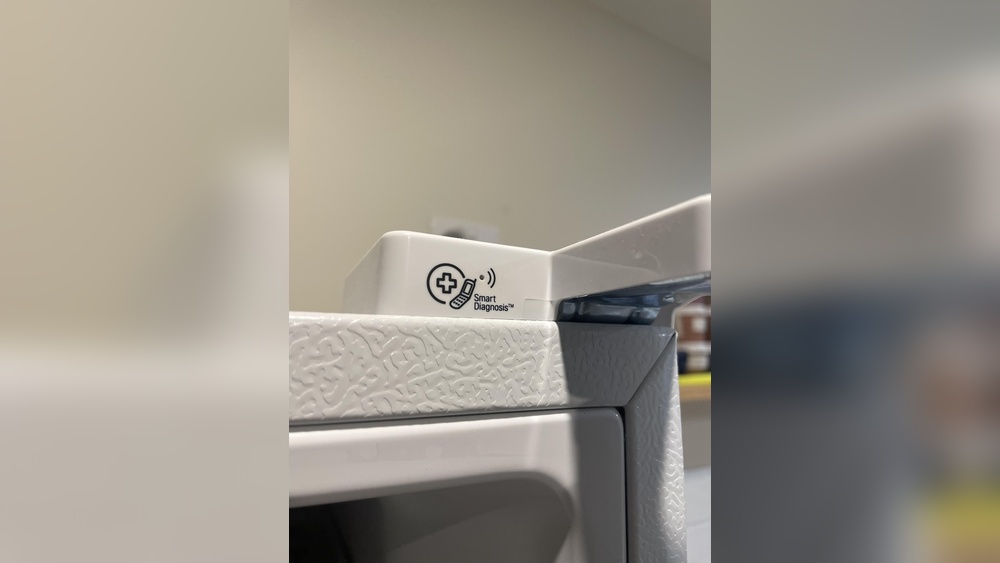
Open the LG ThinQ app and go to the Smart Diagnosis section. Place your phone’s microphone near the fridge’s Smart Diagnosis button. Press and hold the button on the refrigerator for a few seconds. The fridge sends a sound signal to your phone. The app listens and records this signal to analyze the fridge’s condition.
Interpreting Results
After the analysis, the app shows the diagnosis results on the screen. It identifies any issues found and suggests possible solutions. You may see error codes or messages explaining the problem. Follow the app’s advice for simple fixes or contact LG support for help. The results help you understand your fridge better and act quickly.
Common Lg Refrigerator Issues
LG refrigerators are popular for their technology and design. Yet, some common issues affect their performance. Knowing these problems helps in quick troubleshooting and repair. Smart Diagnosis in LG refrigerators can detect many of these faults early. It saves time and reduces repair costs.
Here are some frequent problems found in LG refrigerators:
Linear Compressor Failure
The linear compressor is vital for cooling. Failure causes the fridge to stop cooling properly. You might hear clicking or humming sounds. The freezer may feel warm while the fridge is less cold. This issue is common and can lead to a complete breakdown.
Refrigerant Leaks
Refrigerant leaks happen due to tiny cracks in evaporator coils. These leaks reduce cooling efficiency. The fridge may not keep food cold enough. Fixing leaks requires a professional technician. Ignoring leaks can damage the compressor.
Start Relay Problems
The start relay helps the compressor run. If it fails, the compressor may not start at all. You might hear clicking noises from the back of the fridge. A faulty start relay stops the fridge from cooling. Replacing the relay can restore normal function.
Water Leakage
Water leaks inside or under the fridge are common. Causes include dispenser faults or defrost system issues. Water pooling can damage floors and cabinets. Cleaning clogged drain tubes often solves the problem. Timely repair prevents further damage.
Troubleshooting With Smart Diagnosis
Smart Diagnosis in LG refrigerators helps users fix problems quickly. It sends data from the fridge to LG support or the app. This technology identifies issues without opening the unit. It saves time and avoids unnecessary service calls. Troubleshooting becomes easier and more accurate.
Detecting Compressor Issues
The compressor is the heart of the refrigerator. Smart Diagnosis checks if it runs correctly. It detects unusual sounds like clicking or buzzing. These signs show compressor problems early. The system alerts users before full failure occurs. Early detection helps prevent food spoilage.
Identifying Refrigerant Leaks
Refrigerant leaks reduce cooling power. Smart Diagnosis senses low refrigerant levels or pressure drops. It spots leaks in evaporator coils or lines. The system notifies users to get repair service fast. Fixing leaks early saves energy and stops damage.
Addressing Electrical Failures
Electrical parts control many fridge functions. Smart Diagnosis monitors these components closely. It finds faults like start relay failure or sensor errors. The system warns users about electrical problems. Timely alerts prevent fridge breakdown and costly repairs.
Handling Water Leak Alerts
Water leaks can cause damage and mold. Smart Diagnosis detects water leaks inside or under the fridge. It tracks unusual moisture or dripping sounds. The system sends alerts to users immediately. This helps stop leaks and keeps kitchens safe and dry.
When To Contact Support
Smart Diagnosis in LG refrigerators helps identify many common issues quickly. It can save time by providing basic troubleshooting steps. Despite this, some problems need expert attention beyond the app’s scope.
Contacting support is important when the refrigerator shows serious signs. These include no cooling, unusual noises, or water leaks. If Smart Diagnosis cannot fix the problem, professional help is necessary.
Limitations Of Smart Diagnosis
Smart Diagnosis works best for simple, common problems. It may not detect complex mechanical or electrical faults. Issues like compressor failure or refrigerant leaks require detailed inspection. The tool cannot replace a full professional diagnosis.
It also depends on clear communication between the phone and the refrigerator. Background noise or weak signals can cause errors. Use Smart Diagnosis only as a first step, not a full solution.
Warranty And Repair Options
Check your refrigerator’s warranty before calling support. Many repairs like compressor replacement are covered for a limited time. Unauthorized repairs might void the warranty, so contact LG support first.
LG often offers repair services or authorized technician referrals. Keep your purchase receipt and model details ready. These help speed up the repair process and verify warranty status.
Professional Service Recommendations
Seek professional service if the fridge stops cooling or makes loud noises. Water leaks and electrical issues also need expert repair. Avoid DIY fixes for these problems to prevent damage or safety risks.
Authorized LG technicians have proper tools and training. They provide reliable repairs and genuine parts. Contact LG support to schedule a service visit for best results.

Credit: www.reddit.com
Tips For Maintenance
Maintaining your LG refrigerator is key to keeping the Smart Diagnosis feature working well. Good care helps the fridge run smoothly and avoids common issues. Follow simple steps to keep the appliance clean and efficient.
Regular Cleaning
Clean the inside of the fridge every few weeks. Remove food spills quickly to stop odors and bacteria. Wipe shelves, drawers, and door seals with a soft cloth and mild soap. Don’t forget to clean the water dispenser and ice maker if your model has them.
Also, clean the condenser coils at least twice a year. Dust on coils can cause the compressor to work harder. Use a vacuum or brush to remove dust from the coils behind or beneath the fridge.
Proper Ventilation
Keep space around the fridge clear for air to flow. Leave at least two inches between the fridge and walls. Proper ventilation helps the compressor cool efficiently.
Avoid blocking vents inside the fridge with food items. This ensures cold air spreads evenly. Good air circulation protects the compressor and reduces energy use.
Avoiding Common Mistakes
Do not overload the fridge with food. Too much food blocks air circulation and strains the compressor. Avoid opening the door too often or leaving it open for a long time.
Don’t place hot or warm food directly inside. Let it cool first to prevent extra work for the compressor. Avoid using sharp objects to remove ice, as this can damage the fridge’s parts.
Frequently Asked Questions
How Do I Use My Lg Smart Diagnosis?
Open the LG ThinQ app and tap “Smart Diagnosis” on the home screen. Select your product to start diagnosis. Hold your phone near the appliance’s speaker during the process. The app analyzes sounds to detect issues and suggests solutions quickly.
What Is The Most Common Problem With Lg Refrigerators?
The most common problem with LG refrigerators is linear compressor failure. It causes poor cooling, strange noises, and premature breakdowns. Other issues include refrigerant leaks, faulty start relays, and water leaks. These problems often require professional repair or warranty support.
Is Lg Smart Diagnosis Free?
Yes, LG Smart Diagnosis is free. It helps quickly identify appliance issues via the LG ThinQ app or phone call.
Is There A Reset Button On A Lg Refrigerator?
LG refrigerators do not have a dedicated reset button. To reset, unplug the unit for 5-10 minutes, then plug it back in. This restarts the system and clears minor errors. For persistent issues, consult the user manual or contact LG support.
Conclusion
Smart Diagnosis in LG refrigerators helps spot problems fast. It saves time by giving clear error info. Users can fix small issues or share details with repair services. This feature makes maintenance easier and keeps your fridge running well. Knowing how to use Smart Diagnosis can avoid bigger troubles later.
It’s a smart tool for better fridge care every day. Simple, quick, and helpful for all LG refrigerator owners.

Hi, I’m the lead researcher and appliance enthusiast behind RefrigeratorSolve. With years of hands-on experience troubleshooting cooling systems and testing home appliances, I am dedicated to bringing you honest reviews, energy-saving tips, and practical solutions to keep your refrigerator running perfectly.