If your Samsung fridge shows flashing lights, it wants to tell you something. These lights are not just for show. They signal important messages about the fridge’s health. Understanding these signals helps you keep your fridge working well.
Why Does My Samsung Fridge Flash Lights?
A flashing light on your Samsung fridge means it needs your attention. Often, it shows a problem or a warning. The fridge tries to keep your food safe and fresh. When something is wrong, the lights blink to alert you.
Common Reasons For Flashing Lights
- Temperature Too High: If the fridge or freezer is too warm, the lights may blink.
- Door Left Open: A door that is open or not closed properly can cause flashing lights.
- Error Codes: Some flashing lights mean there is a technical error inside the fridge.
- Water Filter Needs Change: A blinking light may remind you to replace the water filter.
- Power Issues: After a power outage, lights may flash to show the fridge is resetting.

Credit: www.youtube.com
What Do The Flashing Lights Mean?
Different lights and patterns mean different things. Here are some common meanings of Samsung fridge flashing lights:
| Light Type | Meaning | What To Do |
|---|---|---|
| Temperature Display Flashing | Fridge or freezer is too warm. | Check doors. Close any open doors. Wait for cooling. |
| Door Alarm Light | Door open too long or not closed well. | Close the door properly. Clean the door seal if needed. |
| Water Filter Light | Water filter needs replacement. | Change the water filter as per instructions. |
| Error Code Light | Technical issue inside the fridge. | Look up the error code. Call service if needed. |
| Power Reset Light | Fridge is resetting after power outage. | Wait a few minutes. The light will stop flashing. |
How To Fix A Samsung Fridge With Flashing Lights
If your Samsung fridge has flashing lights, you can try some simple steps. These steps can solve many problems without a service call.
1. Check The Doors
Make sure all doors close tightly. A door left open causes temperature rise and flashing lights. Clean door seals if they are dirty. Sometimes food or ice blocks the door from closing. Remove any obstructions.
2. Check The Temperature Settings
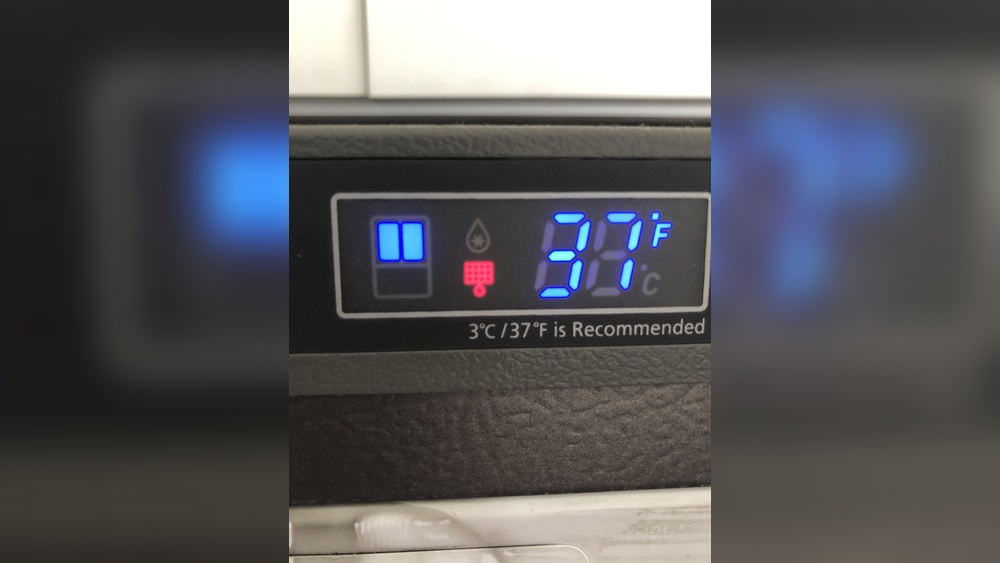
The fridge and freezer must be set to the right temperatures. Usually, fridge temperature is around 37°F (3°C). Freezer temperature is about 0°F (-18°C). If settings are too high, the fridge flashes a warning.
3. Replace The Water Filter
If the water filter light blinks, it means the filter is old. Replace it to keep water clean and the fridge working well. Check your fridge manual for the right filter type.
4. Reset The Fridge
Sometimes, resetting the fridge stops flashing lights. Unplug the fridge or turn off the power at the breaker. Wait about five minutes. Then plug it back in or turn power on. This can clear some errors and stop blinking lights.
5. Look Up Error Codes
Some Samsung fridges show error codes with flashing lights. These codes help find the exact problem. Common codes mean sensor or fan problems. Write down the code and check your manual or online for help.
What If The Lights Keep Flashing?
If lights keep flashing after you try fixes, do not ignore it. The fridge might have a bigger problem. Contact Samsung support or a repair technician. Fixing issues early saves money and keeps food safe.
How To Understand Samsung Fridge Symbols
Samsung fridges have symbols on the display. These icons show fridge status. Here are some common ones:
- Energy Saver Icon: Shows energy-saving mode is on.
- Alarm Icon: Means door is open or temperature is high.
- Water Filter Icon: Shows filter needs changing soon.
- Ice Maker Icon: Shows ice making is on or off.

Credit: www.reddit.com
Tips To Keep Your Samsung Fridge Healthy
To avoid flashing lights and problems, follow these tips:
- Check door seals regularly for dirt or damage.
- Keep the fridge temperature at the right level.
- Change water filters on time.
- Don’t overload the fridge with too much food.
- Clean inside the fridge regularly.
- Keep vents inside the fridge clear for air flow.
- Reset the fridge if it acts strangely.
Frequently Asked Questions
Why Is My Samsung Refrigerator Blinking Lights?
Your Samsung refrigerator blinks lights to signal issues like high temperature or an open door. Check and close doors properly. Ensure proper cooling. Blinking alerts help prevent food spoilage and indicate when the fridge needs attention or reset.
How Do I Force My Samsung Fridge To Reset?
Unplug your Samsung fridge or turn off its power at the breaker. Wait five minutes, then plug it back in. This forces a reset and clears errors. For Family Hub models, use Settings > About > Factory Reset to restore default settings.
What Do The Symbols Mean On My Samsung Fridge?
Samsung fridge symbols indicate functions and alerts. Energy Saver shows power saving mode. Alarm signals door or temperature issues. Water Filter icon warns filter replacement. Lighting icon controls fridge light. Cubed Ice and Ice Off icons manage ice maker settings.
What Is The Most Common Samsung Fridge Error?
The most common Samsung fridge error involves temperature sensor or fan issues, often showing error codes like 1E, 5E, or 22E. These errors cause temperature fluctuations or cooling problems. Checking sensors and fans usually resolves the issue quickly.
Conclusion
Samsung fridge flashing lights are important signals. They tell you when something needs checking or fixing. Most flashing lights warn about doors, temperature, or filters. Simple steps can often fix the problem. Understanding these signals helps you keep your fridge working well. If problems continue, call a professional for help.

Hi, I’m the lead researcher and appliance enthusiast behind RefrigeratorSolve. With years of hands-on experience troubleshooting cooling systems and testing home appliances, I am dedicated to bringing you honest reviews, energy-saving tips, and practical solutions to keep your refrigerator running perfectly.