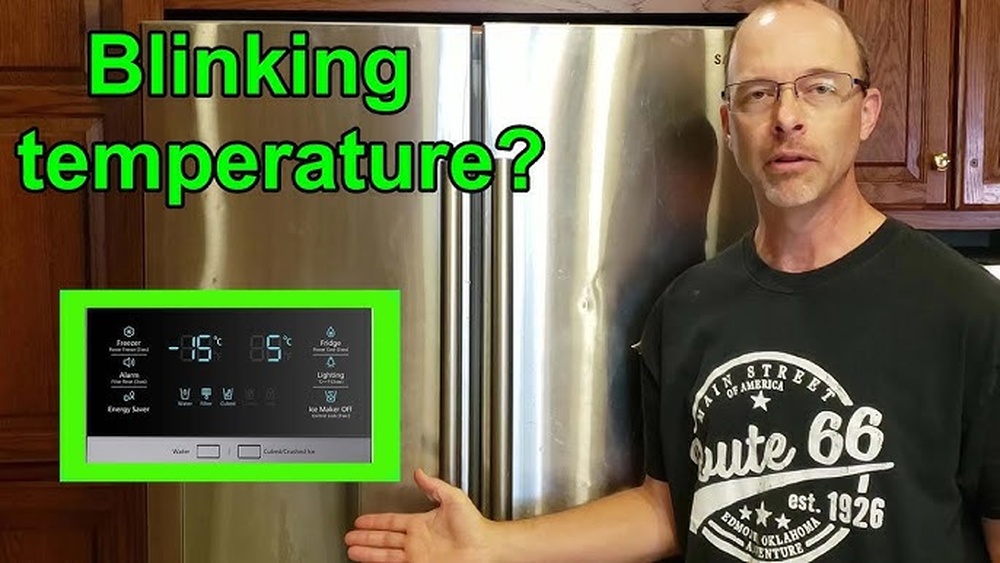
If you have a Samsung refrigerator, you might see a blinking temperature light. This can be confusing and worrying. But do not worry. This article will explain why the temperature light blinks. It will also tell you how to fix this issue step by step.
What Does the Blinking Temperature Light Mean?
The blinking temperature light on your Samsung fridge is a way to get your attention. It shows something is wrong with the temperature inside your fridge or freezer. Usually, it means the temperature is too high. Your food may not be cold enough to stay fresh.
There are some common reasons why the temperature light blinks:
- Door Left Open: If the fridge or freezer door is open too long, the temperature goes up.
- Power Outage: A recent power cut can cause the temperature to rise inside.
- Overcrowded Fridge: Too much food blocks air flow, making it warm inside.
- Faulty Door Seal: If the door seal is broken, cold air escapes.
- Temperature Setting Too High: The fridge temperature might be set too warm.
- Defrost System Problem: Ice build-up can stop the fridge from cooling well.

Credit: www.youtube.com
Why Does Samsung Refrigerator Temperature Light Keep Blinking?
The blinking light keeps flashing because the fridge wants you to act fast. It means the temperature is not safe for your food. The fridge tries to cool down but cannot reach the right temperature.
When you ignore the blinking light, food can spoil. This can cause waste and cost more money. So, it is important to solve the problem quickly.
How to Fix Samsung Refrigerator Blinking Temperature Light
Here are easy steps to fix the blinking temperature light. You can try these at home before calling for help.
1. Check The Doors
Make sure the fridge and freezer doors are fully closed. Sometimes a small gap can let warm air in. This causes the temperature to rise.
Look for these problems:
- Is the door seal clean and not broken?
- Is anything blocking the door from closing?
- Is the door left open by accident?
2. Adjust The Temperature Settings
The temperature control might be set too warm. Follow these steps to check and change the settings:
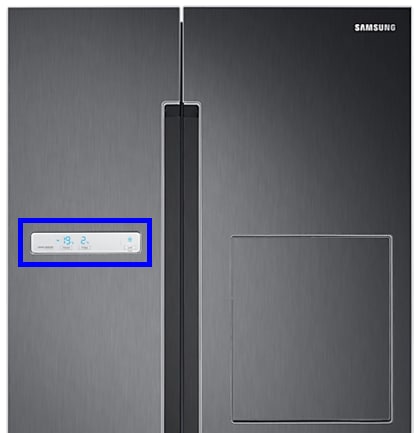
- Find the control panel inside the fridge or on the door.
- Press the Fridge button to set the fridge temperature.
- Press the Freezer button to set the freezer temperature.
- Set fridge temperature between 37°F and 40°F (3°C to 5°C).
- Set freezer temperature at 0°F (-18°C).
After changing the settings, wait for some hours. The blinking light should stop if the temperature goes down.
3. Avoid Overcrowding
Do not put too much food inside. Overcrowding blocks air flow. This stops cold air from moving inside the fridge.
Keep space between food items. This helps cold air move freely. It keeps your food fresh and stops the temperature light from blinking.
4. Clean The Door Seals
Dirty door seals do not close well. Clean the seals with warm water and mild soap. Use a soft cloth to wipe them.
Check for cracks or damage. If the seal is broken, replace it. This will stop warm air from entering.
5. Perform A Soft Reset
Sometimes the control panel needs a quick reset. This can fix small errors in the system.
To do a soft reset:
- Locate the control panel inside the fridge or on the door.
- Press and hold the Power Cool button for 3 to 5 seconds.
- The temperature display will blink or turn off.
- Release the button and wait for the fridge to restart.
This often stops the blinking light if the problem was a small glitch.
6. Perform A Hard Reset (power Cycle)
If the soft reset does not work, try a hard reset:
- Unplug the fridge from the power outlet.
- Wait for 5 to 10 minutes.
- Plug the fridge back in.
- The fridge will restart and reset all settings.
This can fix deeper problems in the fridge system.
7. Check For Ice Build-up
Ice build-up inside the freezer can block airflow. This causes temperature problems.
Look for thick ice on the freezer walls or shelves. If you see ice, defrost the freezer:
- Remove all food from the freezer.
- Turn off the fridge or unplug it.
- Leave the freezer door open to melt ice.
- Clean the water and dry the freezer once ice melts.
- Turn the fridge back on and wait for cooling.
8. Use Power Cool And Power Freeze Features
Samsung fridges have special buttons to cool fast:
- Power Cool: Quickly cools the fridge.
- Power Freeze: Quickly cools the freezer.
To use these:
- Press and hold the Fridge button for Power Cool.
- Press and hold the Freezer button for Power Freeze.
- Hold the button for 3 to 5 seconds.
This helps if you just added many groceries or food is warm.
When to Call for Service
If you tried all steps and the light keeps blinking, call a Samsung service center. There might be a problem with the cooling system or sensors.
Signs you need professional help:
- Fridge is very warm inside.
- Freezer is not freezing food.
- Strange noises from the fridge.
- Temperature light blinks even after reset.
Summary Table: Reasons and Fixes for Blinking Temperature Light
| Reason | What to Do |
|---|---|
| Door left open | Close door fully and check seal |
| Power outage | Wait for fridge to cool or reset |
| Overcrowded fridge | Remove excess food for air flow |
| Broken door seal | Clean or replace door seal |
| Wrong temperature setting | Adjust fridge and freezer temperature |
| Ice build-up | Defrost freezer to remove ice |
| System glitch | Perform soft or hard reset |
Credit: www.samsung.com
Final Thoughts
The blinking temperature light in your Samsung fridge is a warning. It tells you the fridge is not cold enough. By following simple steps, you can fix many problems at home. Check doors, clean seals, and adjust settings first. Use reset options if needed.
If the problem stays, do not wait. Contact Samsung service. Keeping the right temperature is important for your food safety. It saves money and keeps your family healthy.
Take care of your fridge. It will work better and last longer. The blinking light is a helpful signal. Listen to it and act soon.
Frequently Asked Questions
Why Does My Samsung Fridge Temperature Keep Blinking?
Your Samsung fridge temperature blinks to alert high temperature or an open door. Check the door seal and close it properly. Blinking also indicates the fridge is cooling down after being recently opened. Perform a quick reset if the issue persists to restore normal operation.
How To Reset Samsung Fridge Temperature?
To reset your Samsung fridge temperature, press the Fridge or Freezer button until the desired temperature shows. For a full reset, unplug the fridge for 5 minutes, then plug it back in. This clears errors and restarts the system. Ensure doors close properly to stop blinking alerts.
How Do I Force My Samsung Fridge To Reset?
Unplug your Samsung fridge for 5 minutes to force a reset. Plug it back in and wait for it to restart. This clears minor glitches and resets the system. For control panel reset, press and hold the Power Freeze and Power Cool buttons simultaneously for 10 seconds.
Why Is My Samsung Refrigerator Blinking C 76?
The Samsung refrigerator blinking C 76 error indicates a communication issue between the main control board and the display board. Check wiring connections and perform a reset to fix it. If the problem persists, contact Samsung support or a professional technician.

Hi, I’m the lead researcher and appliance enthusiast behind RefrigeratorSolve. With years of hands-on experience troubleshooting cooling systems and testing home appliances, I am dedicated to bringing you honest reviews, energy-saving tips, and practical solutions to keep your refrigerator running perfectly.